
Decision guide
Claude or ChatGPT scheduled tasks vs a team platform
When Claude's or ChatGPT's built-in scheduling is enough, and when the team needs its own automations.
By Type.com Team
Do you need a separate automation platform if Claude or ChatGPT already schedules tasks?
If your scheduled tasks are personal, like one person's daily summary, Claude's or ChatGPT's built-in scheduling is usually enough; once tasks need to run for the team, touch shared tools, or keep going when someone's away, a team automation platform like Type.com is the next step.
You may not need one. Both Claude and ChatGPT now run scheduled tasks in the cloud, with your connectors, on a cadence you choose. For one person's morning brief, inbox digest, or weekly research, that is the simplest setup and you should keep it.
The question changes when a task stops being yours. A weekly pipeline review that the whole sales team reads, a support digest that pulls from the company help desk, or a report that has to arrive while its author is on vacation all need an owner other than one person's account. That is the job of a team automation platform.
What do Claude and ChatGPT scheduled tasks do well today?
Both run recurring prompts in the cloud with your connected tools, and ChatGPT Business and Enterprise also offer team tasks that a team owns together.
Claude scheduled tasks are on every paid plan. You describe a task once, pick hourly, daily, weekdays, or weekly, and Claude runs it remotely, even when your computer is asleep. Each run can use your connectors, skills, and plugins, and you manage runs from the Scheduled page. Tasks that need local files or apps run only on your computer.
ChatGPT scheduled tasks run one-time or recurring prompts and can start from Gmail, Slack, or GitHub events. Business plans allow 10 active tasks and Enterprise 15. You can share a task as a link, and each recipient schedules their own copy with their own connections.
In late October 2026, OpenAI added team tasks for Business and Enterprise workspaces. A team owns the task, it runs in the cloud under the team's service account with workspace connections, and teammates can view, run, edit, pause, or delete it based on their permissions. For a company that works only in ChatGPT, this covers much of what a team needs.
| Feature | Who has it | Who owns the task |
|---|---|---|
| Claude scheduled tasks | Pro, Max, Ultra, Team, and Enterprise | The person who created it |
| ChatGPT scheduled tasks | Free through Enterprise, with plan limits on active tasks | The person who created it; shared links create copies |
| ChatGPT team tasks | Business and Enterprise workspaces | A team, using the team's service account and connections |
What are the signs you've outgrown built-in scheduled tasks?
You've outgrown built-in scheduled tasks when two or more of these are true for a task the team depends on.
Score each recurring task on its own. A personal research brief and a team pipeline review can live in the same company, and they deserve different homes.
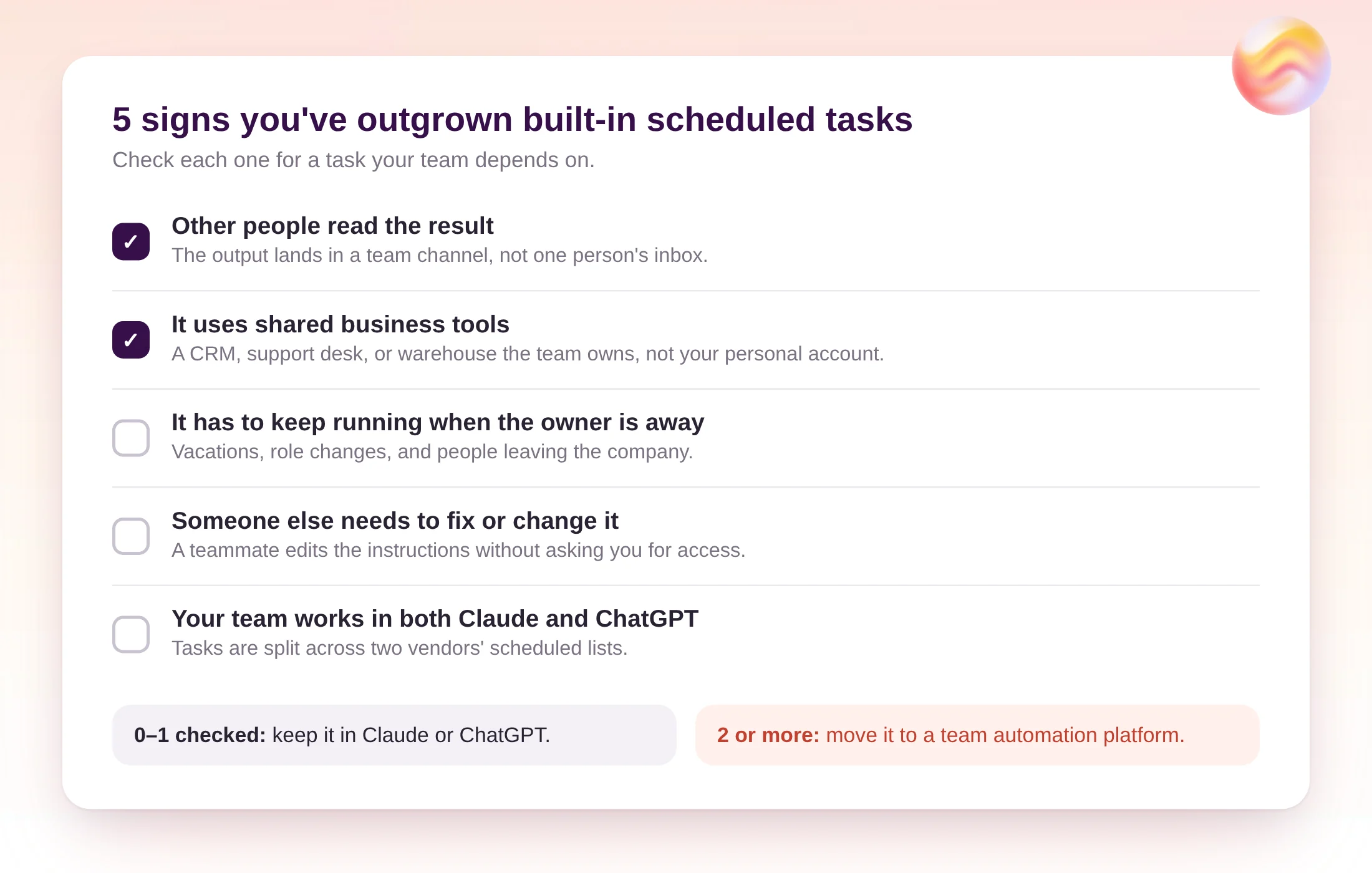
- Other people read the result: the output goes to a team channel, not one person's inbox.
- It uses shared business tools: a CRM, help desk, or data warehouse the company owns.
- It has to keep running when the owner is away: vacations, role changes, and departures.
- Someone else needs to fix or change it: a teammate should edit the instructions without borrowing an account.
- Your team works in both Claude and ChatGPT: tasks are split across two vendors' scheduled lists.
How do built-in scheduled tasks compare with a team platform?
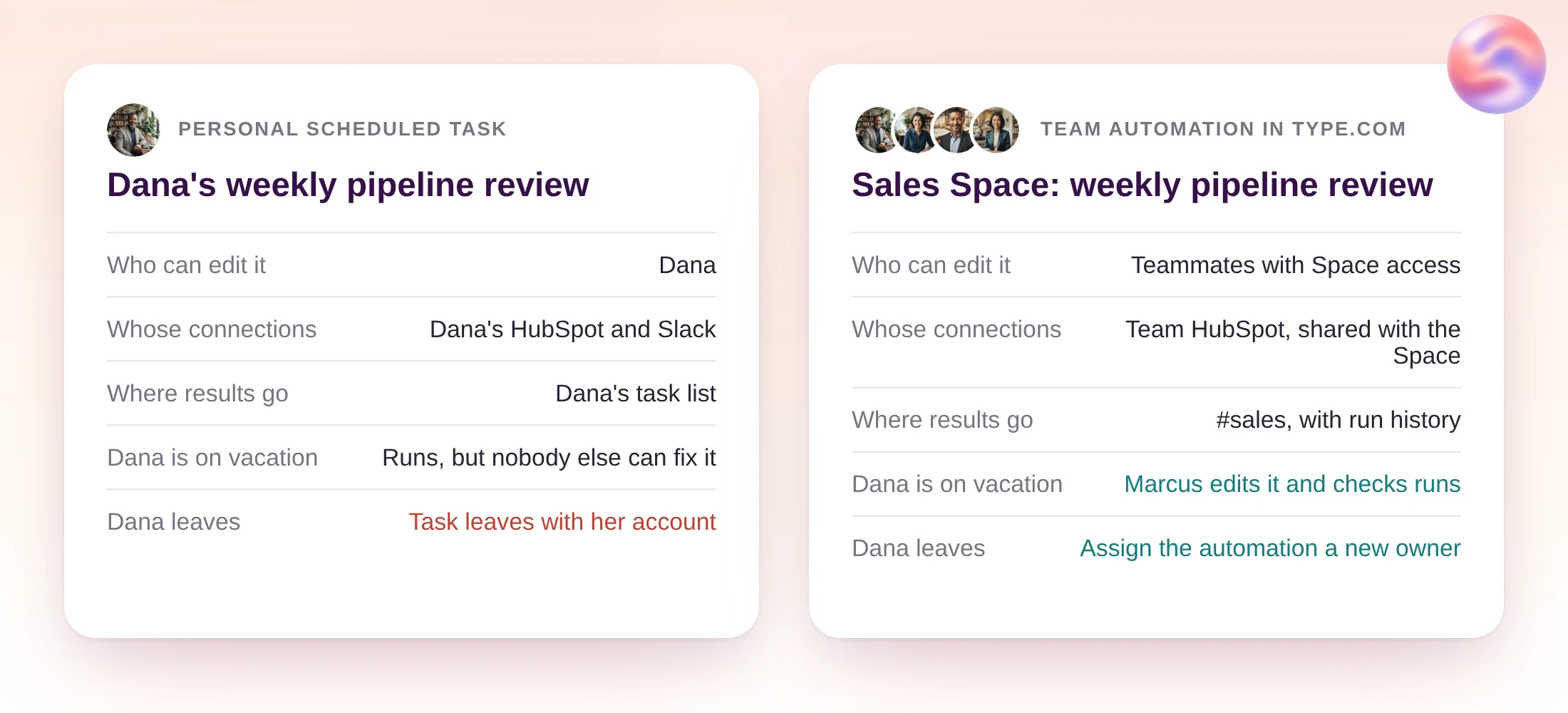
Built-in tasks are tied to one vendor and, outside ChatGPT team tasks, to one person; Type.com runs team automations on Claude or Codex from a shared Space.
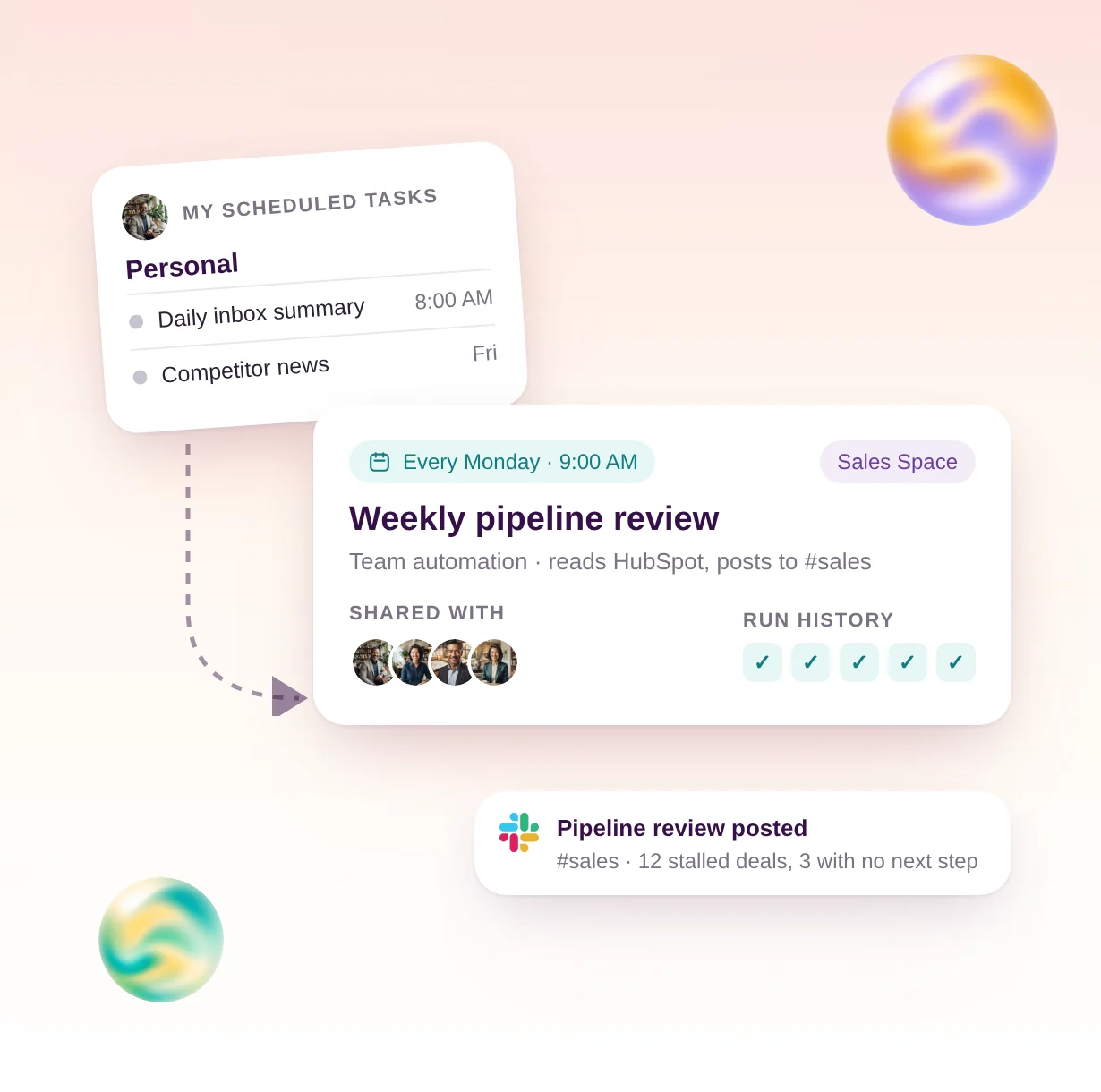
In Type.com, an automation belongs to a Space, the shared computer for one team. It runs on a weekly, monthly, or interval schedule in the time zone you pick, uses the Space's Team connections, and posts to the channel you choose. Teammates with access open the same automation, read its run history, and edit its instructions in plain language.
| Option | Runs when your laptop is off | Shared with the team | Works with Claude + Codex | Who it's for |
|---|---|---|---|---|
| Claude scheduled tasks | Yes, except tasks that need local files or apps | No, each task belongs to its creator | Claude only | One person's recurring work on a paid Claude plan |
| ChatGPT scheduled tasks | Yes, except tasks that run only on your computer | As a copy link; each person runs their own copy | OpenAI models only | One person's reminders, briefs, and monitors |
| ChatGPT team tasks | Yes, in the cloud | Yes, owned by a team with permissions per action | OpenAI models only | Business and Enterprise teams that work in ChatGPT |
| Type.com | Yes, in the cloud | Yes, owned by a Space, with run history and version history | Yes, Claude or Codex per automation | Teams whose automations span tools, models, and people |
How does the cost compare: per seat vs per workspace?
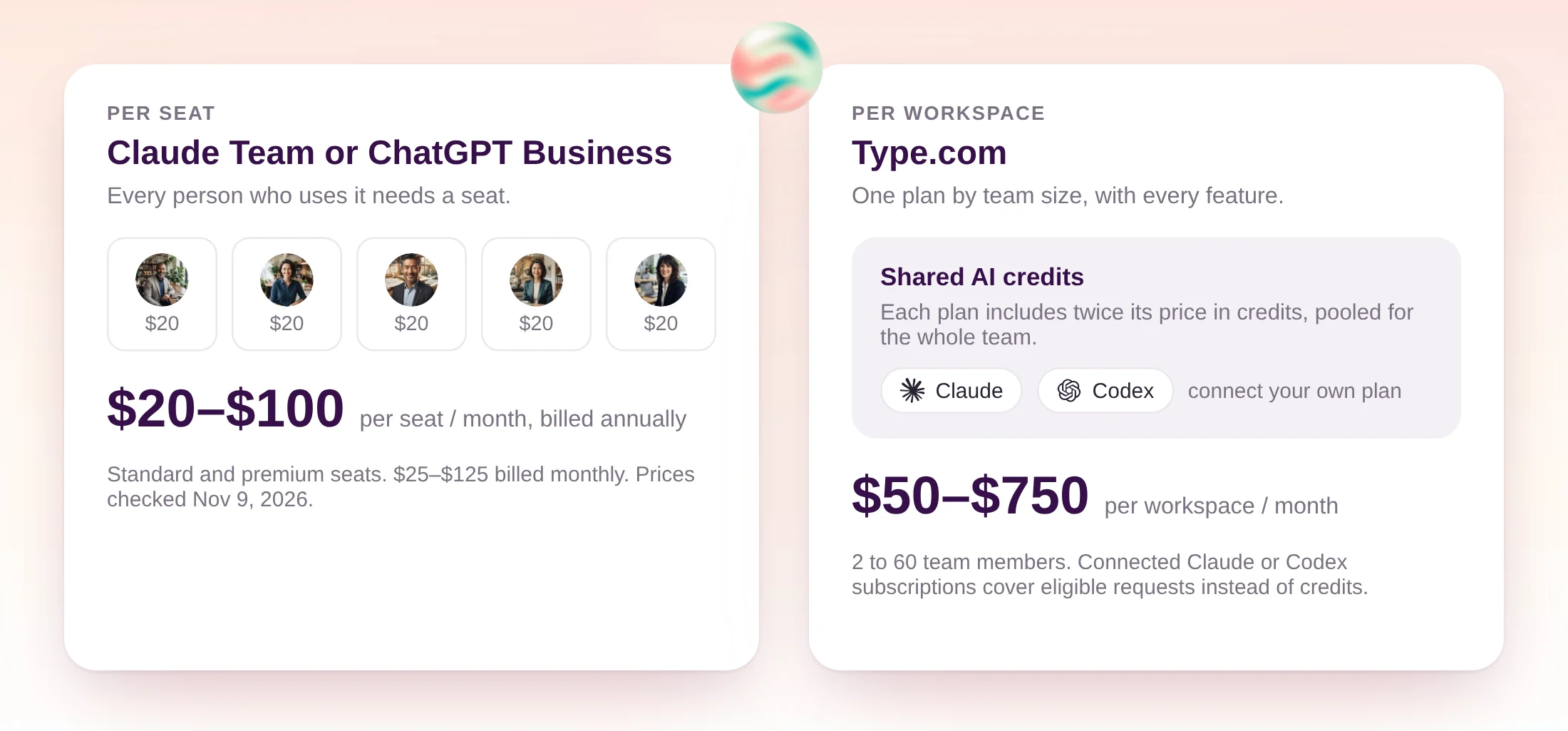
Claude Team and ChatGPT Business charge per seat; Type.com charges per workspace and lets people connect the Claude or ChatGPT plans they already pay for.
Prices below come from Claude's pricing page, ChatGPT Business pricing, and Type.com pricing, checked on November 9, 2026.
The two models aren't substitutes. Most teams keep their Claude or ChatGPT seats for everyday chat and connect them to Type.com, so the team automations run through subscriptions they already pay for. When a creator hasn't connected one, the run uses the workspace's included credits.
| Plan | Pricing model | Price | What a 10-person team pays |
|---|---|---|---|
| Claude Team | Per seat | $20 standard or $100 premium per seat a month, billed annually ($25 or $125 monthly) | $200 a month for 10 standard seats, billed annually |
| ChatGPT Business | Per seat | $20 standard or $100 premium per seat a month, billed annually ($25 or $125 monthly) | $200 a month for 10 standard seats, billed annually |
| Type.com | Per workspace | Basic $50 (2 members), Pro $100 (4), Enterprise $250 (20), $500 (40), or $750 (60) a month; credits worth twice the price | $250 a month on Enterprise, with $500 of AI usage; connected Claude or Codex subscriptions cover eligible requests |
How do you move a scheduled task over to a team platform?
Copy the task's instructions into a Type.com automation in the team's Space, connect the shared tools once, test it privately, then pause the old task.
Start with the task that scored highest on the checklist. Here, a weekly pipeline review that one sales lead built in her personal Scheduled list moves to the Sales Space.
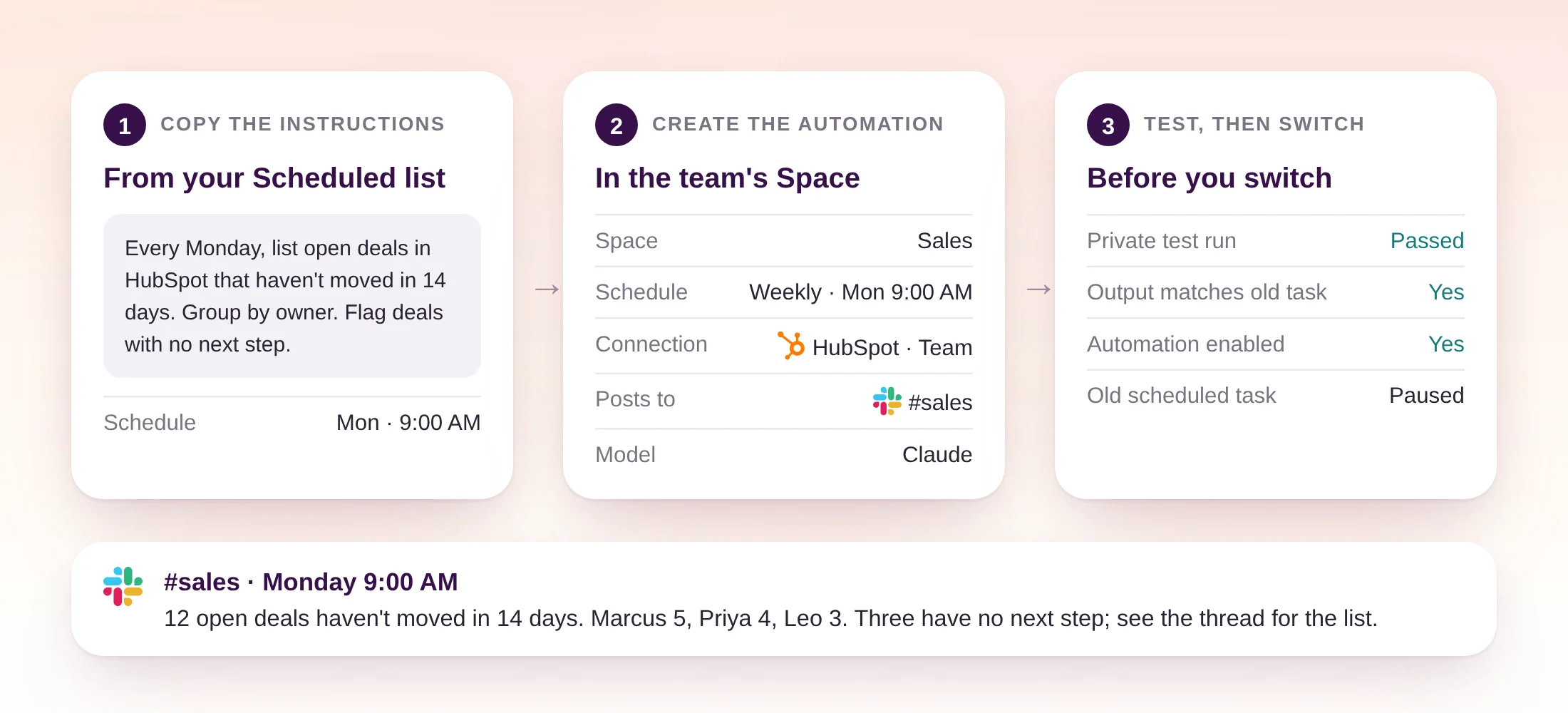
- 1
Copy the task's instructions
Open the task from Scheduled in Claude or ChatGPT and copy its prompt, cadence, and time zone. Note which connectors it uses.
- 2
Connect the shared tools to the Space once
Add business systems like the CRM as Team connections and give the Space access. Teammates then use the same access without connecting their own accounts.
- 3
Create the automation
Choose Create, Automation, pick the Space, and paste the instructions. Set the schedule, the model, and the channel where results should go. New automations start paused.
- 4
Test it privately
Select Test to run the automation in a private conversation and compare its output with the old task's last result.
- 5
Enable it and pause the original
Enable the automation, let both run for one cycle, then pause or delete the personal task so the team gets one result.
Prompt to create the automation in the Space
Create a scheduled automation in this Space that runs every Monday at 9:00 AM Pacific. Instructions: list open HubSpot deals that haven't moved in 14 days, group them by owner, and flag deals with no next step. Post the summary in #sales and put the full list in the thread. Use the team HubSpot connection. Leave it paused so I can test it first.
When are Claude's or ChatGPT's scheduled tasks the better choice?
Keep a task in Claude or ChatGPT when one person owns it, reads it, and would fix it themselves.
Built-in scheduling is the better choice for personal work: a daily inbox summary, a morning calendar brief, a reminder, or a weekly read of industry news. It is already in the app you use, runs in the cloud, and needs no extra setup.
ChatGPT team tasks are a good fit for a team that works only in ChatGPT and wants a few shared recurring tasks on workspace connections. Pick a team platform when the team works across Claude and Codex, wants automations next to its shared skills and documents, or needs one place to see every recurring run.
If your recurring work is in Claude Code, see how to run Claude Code on a schedule without keeping a laptop on.
- One person owns it and reads the result: keep it built in.
- It uses only your personal accounts: keep it built in.
- A ChatGPT-only team needs a few shared tasks: try ChatGPT team tasks.
- The team relies on it across tools and models: move it to Type.com.
How does a team automation keep running when its creator is away?
Type.com pauses an automation that keeps failing, tells its creator, and keeps every run in history so the team can fix it.
A scheduled instruction automation in Type.com pauses after three consecutive failed runs, or immediately when a person has to act, such as reconnecting an account. Type.com posts a pause notice that mentions the creator. Anyone with access opens the run history, reads the error, fixes the cause, and enables it again.
Every saved change creates a version, so a teammate can review who changed the instructions and restore an earlier one. That is what keeps a team task running after the person who wrote it moves on.
Frequently asked questions
Can ChatGPT team tasks post to Slack?
Yes. ChatGPT team tasks in Business and Enterprise workspaces can post to an approved Slack channel when a workspace admin has set up a Slack connection for the team and that connection can post in the channel. Team tasks can also start from a new Slack message in a monitored channel.
What happens to my scheduled tasks if I leave the company?
Personal scheduled tasks in Claude and ChatGPT belong to the account that created them, so hand them over before you leave. ChatGPT team tasks belong to a team, so teammates keep maintaining them. In Type.com, automations belong to a Space, and you can assign an automation to a new owner so nothing is missed.
Is a separate automation platform worth it for a 20-person team?
It is when several tasks the team depends on use shared tools or post to shared channels. Type.com is priced per workspace: $250 a month covers up to 20 members and includes $500 of AI usage, and anyone who already pays for Claude or ChatGPT can connect that subscription so eligible requests don't use credits.
Do Claude scheduled tasks run when my computer is off?
Yes. Claude scheduled tasks run remotely on their cadence even when your computer is asleep or the Claude desktop app is closed. A task that needs local files or apps runs only on your computer.
Can ChatGPT team tasks replace an automation platform?
For a team that works only in ChatGPT, often yes. Team tasks run in the cloud under the team's service account, use workspace connections, and let teammates view, run, edit, and pause them by permission. A separate platform helps when the team also works in Claude, or wants the same automations across its tools, skills, and Spaces.
Does Type.com replace our Claude or ChatGPT subscription?
No. Team members connect their Claude or Codex subscriptions to Type.com, and eligible requests run through them instead of the workspace's credits. Automations run on the connected subscription of the person who created them.