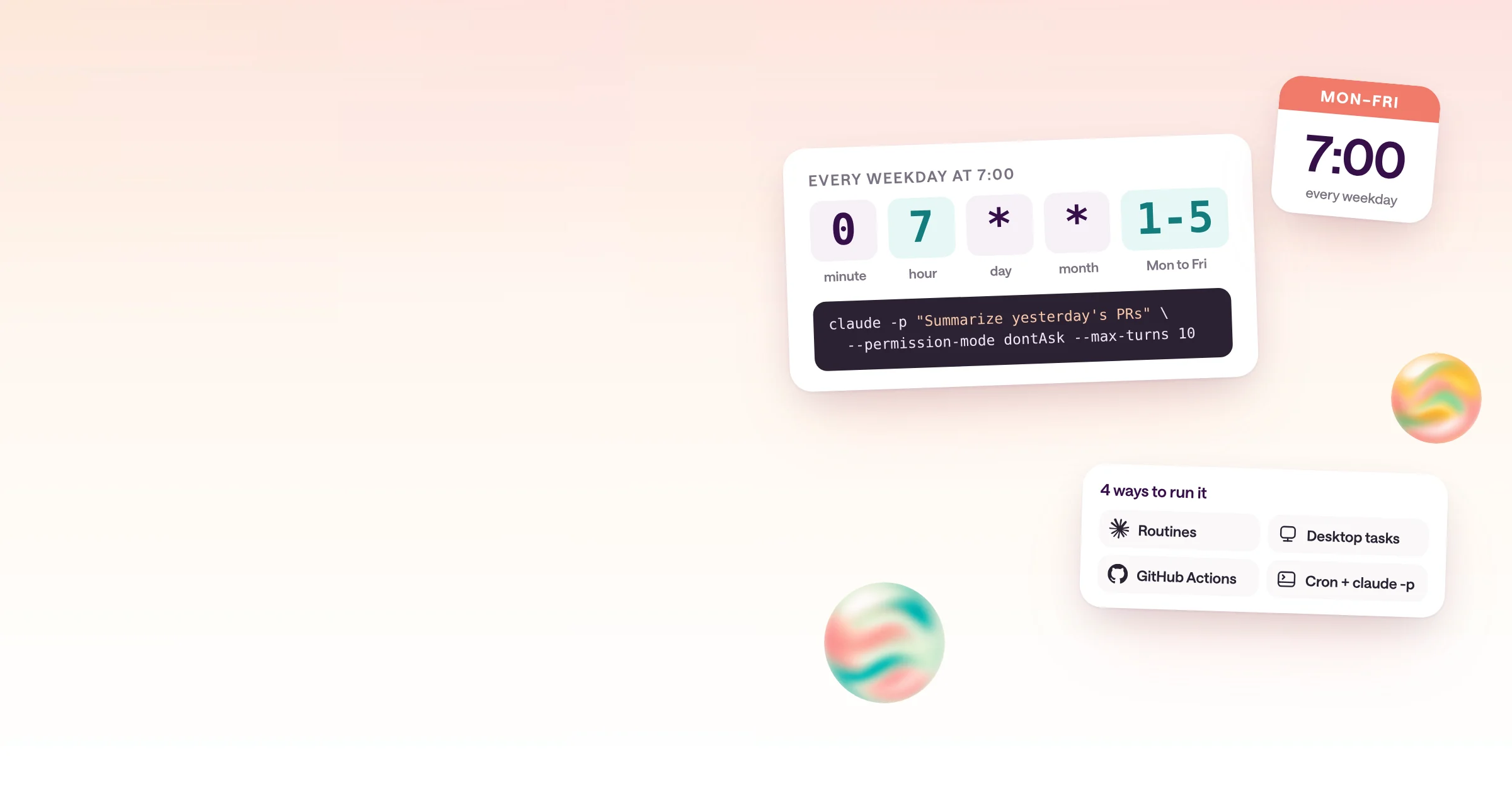
Developer guide
How to run Claude Code on a schedule
Four ways compared: routines, desktop tasks, GitHub Actions, and cron with claude -p, with copyable setups.
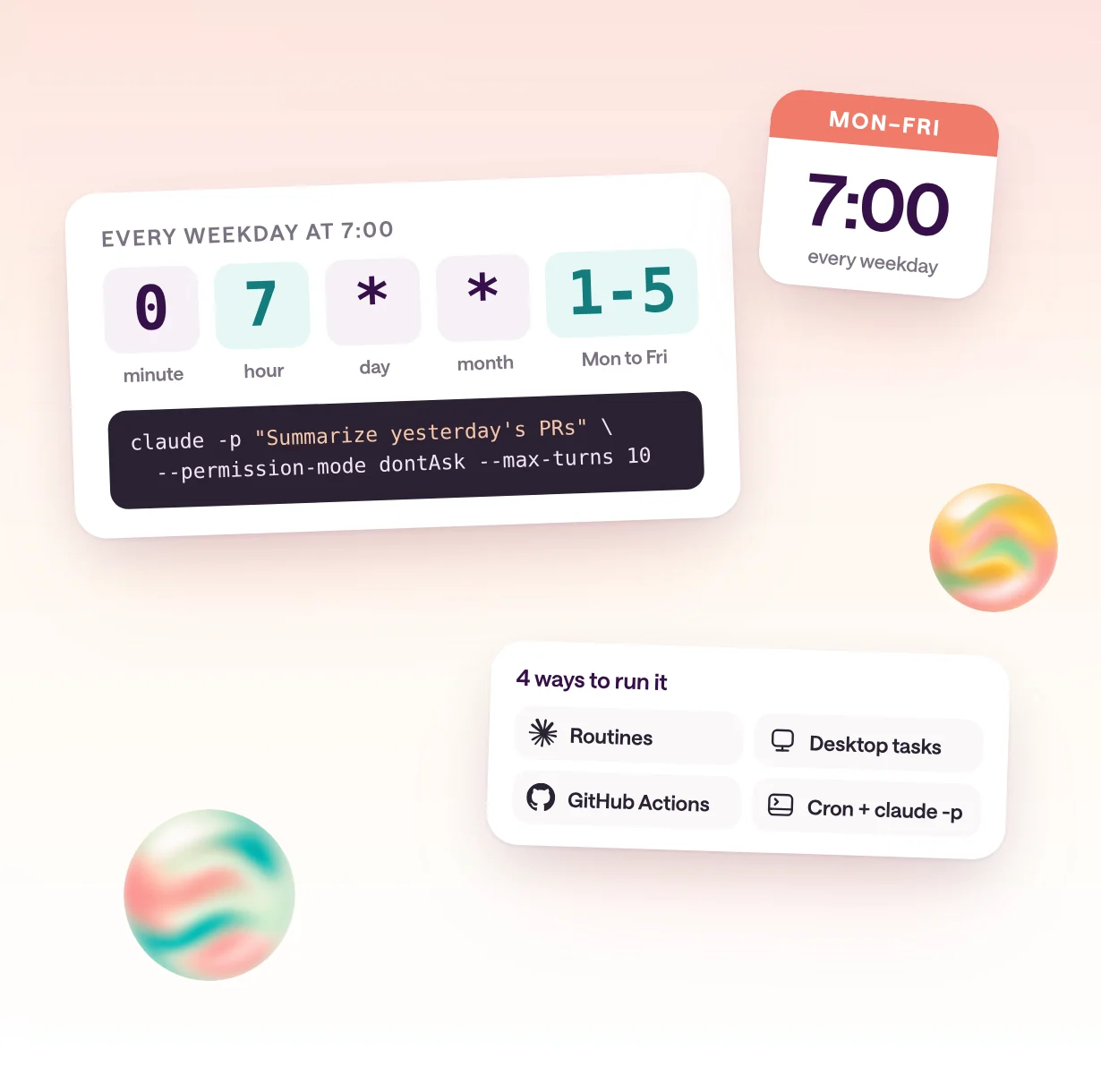
What are the ways to run Claude Code on a schedule?
There are four ways: routines in Anthropic's cloud, Desktop scheduled tasks on your computer, a GitHub Actions workflow with a cron trigger, or your own cron job that runs claude -p. They differ in where the run happens, how often it can run, whether a machine must stay on, and who can see the results.
Anthropic documents three built-in ways to repeat work in its scheduling comparison: cloud routines, Desktop scheduled tasks, and /loop inside an open session. It also documents scheduled GitHub Actions workflows. Running claude -p from your own cron is the fourth way, and the most flexible, but Anthropic publishes no recipe for it, so the setup below is ours, built from the documented flags.
The table compares them as documented on October 15, 2026. If the job should report to a team rather than to you, read the last section first: that is where a managed agent platform fits.
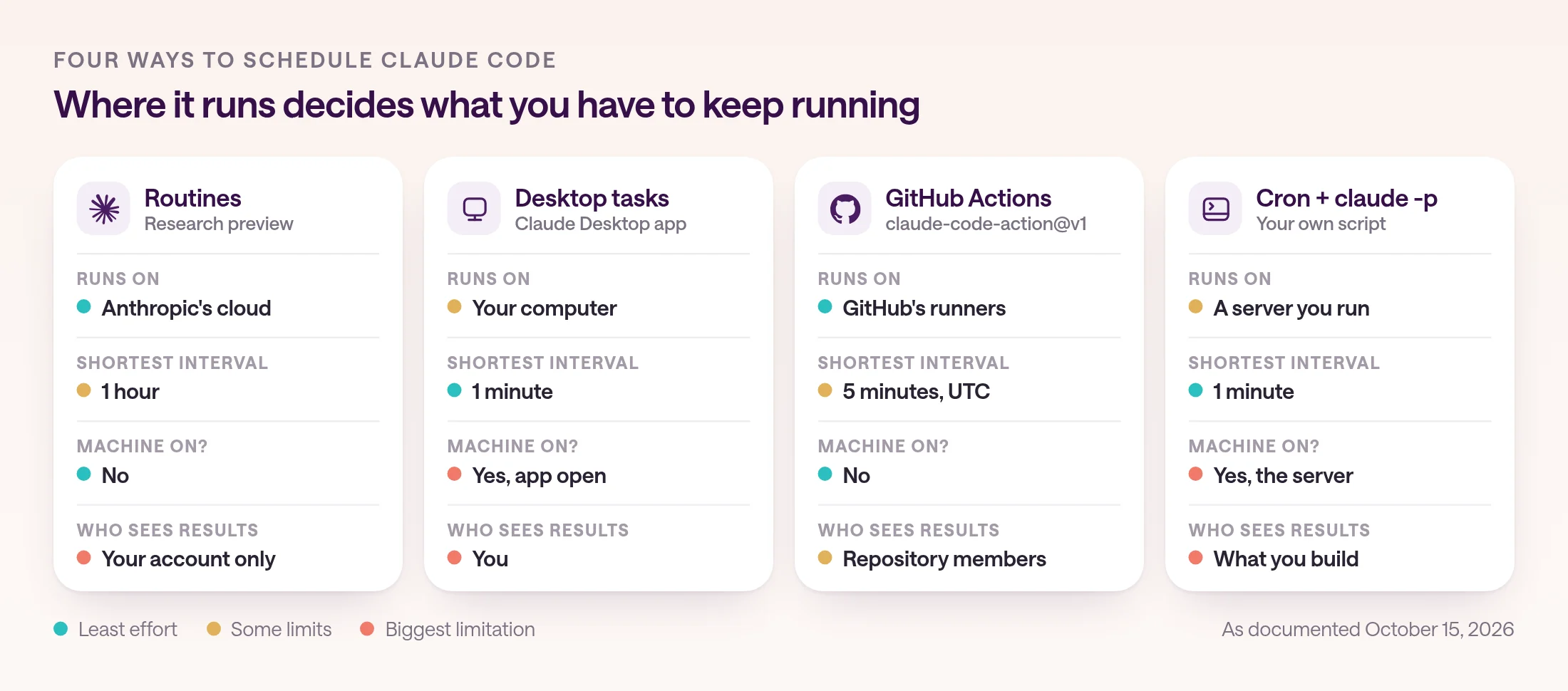
| Option | Runs on | Shortest interval | Machine must stay on | Sign-in and billing | Shared with a team |
|---|---|---|---|---|---|
| Routines | Anthropic's cloud | 1 hour | No | claude.ai subscription: Pro, Max, Team, or Enterprise | No, they belong to your account |
| Desktop scheduled tasks | Your computer | 1 minute | Yes, with the app open | claude.ai login | No |
| GitHub Actions | GitHub's runners | 5 minutes, in UTC | No | API key or subscription token, stored as a secret | People with access to the repository see the runs |
| Cron with claude -p | A server or VM you maintain | 1 minute | Yes, the server | API key, cloud provider, or subscription token | Only what you build |
How do you run Claude Code without anyone at the keyboard?
Use print mode: claude -p runs one task without the interactive interface and exits. Add --allowedTools for what it may do, --permission-mode dontAsk so it never waits for an answer, --max-turns to cap the work, and --output-format json so your script can read the result and cost.
Anthropic's headless guide covers print mode. Claude Code exits with code 0 on success and a non-zero code on failure, so a script can branch on the result. With --output-format json, the output includes the result, a session ID, and total_cost_usd, which Anthropic notes is a client-side estimate rather than your bill.
Two flags matter most for scheduled jobs. Set the permission mode explicitly, because a run where nothing sets one takes a built-in starting mode. dontAsk is the mode Anthropic describes for locked-down CI: it denies anything that would prompt, while reads in your working directory and the tools you list still run. And add --bare, which Anthropic recommends for scripts and says will become the default for -p: it skips hooks, plugins, MCP servers, auto memory, and CLAUDE.md, so a run behaves the same on every machine.
Bare mode doesn't use your subscription login. It needs an API key in ANTHROPIC_API_KEY, an apiKeyHelper, or cloud provider credentials. That suits a scheduled job anyway: in -p mode, an API key in the environment is always used and billed per token.
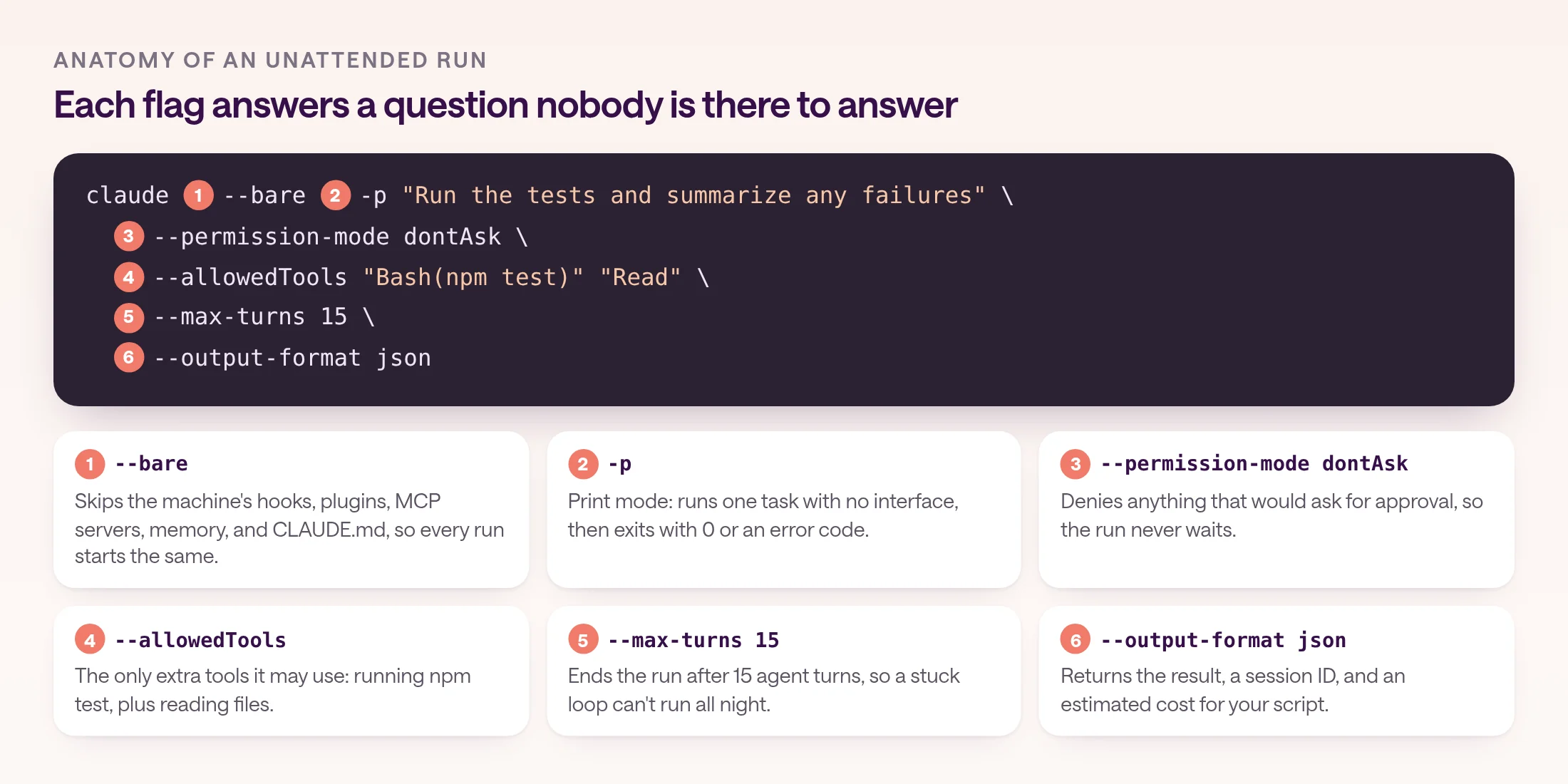
claude --bare -p "Run the tests and summarize any failures" \
  --permission-mode dontAsk \
  --allowedTools "Bash(npm test)" "Read" \
  --max-turns 15 \
  --output-format json
How do you schedule Claude Code with cron?
Put the claude -p command in a small script on a server that stays on, load the API key from a file only that user can read, prevent overlapping runs, save each run's JSON, and add one crontab line.
Cron is the most flexible option: any schedule, any machine, any repository, and full access to local files. It is also the one where you own everything. The machine has to stay on, the key has to stay safe, and nobody hears about a failed run unless you build that.
Treat the script below as a starting point. It pulls the latest code, runs one tightly scoped task, refuses to start if the previous run is still going, and writes the JSON result to a dated file. Adapt the prompt and the allowed tools to your job, and give the job only the tools that task needs.
- 1
Use a machine that stays on
A small VM or an always-on server, not a laptop. Install Claude Code there under a dedicated user, and clone the repository the job works in.
- 2
Create an API key for the job
Create a key in the Claude Console for this job alone, so you can track its spend and revoke it without touching anything else. Store it in a file only that user can read.
- 3
Test the command by hand
Run the claude -p line once from a shell as the job's user. Check the JSON, the exit code, and that the run only used the tools you allowed.
- 4
Add the crontab line
Run crontab -e as the job's user and add the schedule. Cron uses the server's time zone, so check it before you pick the hour.
- 5
Decide who hears about results
Cron only writes files. Add a step that posts the summary to Slack or opens an issue, and an alert for non-zero exit codes, or nobody will notice when a run fails.
#!/usr/bin/env bash
# nightly-tests.sh: cron runs this on a server that stays on.
set -euo pipefail
source "$HOME/.claude-env"     # export ANTHROPIC_API_KEY=... (chmod 600)
CLAUDE=/usr/local/bin/claude    # cron's PATH is minimal: use `which claude`
cd /srv/app && git pull --quiet
mkdir -p "$HOME/claude-runs"
flock -n /tmp/nightly-tests.lock \
  "$CLAUDE" --bare -p "Run the tests and summarize any failures" \
  --permission-mode dontAsk \
  --allowedTools "Bash(npm test)" "Read" \
  --max-turns 15 \
  --output-format json > "$HOME/claude-runs/$(date +%F).json"

# crontab -e: weekdays at 7:00, server time
0 7 * * 1-5 /home/ops/bin/nightly-tests.sh 2>> /home/ops/claude-runs/errors.log
How do you run Claude Code on a schedule with GitHub Actions?
Add a workflow with a schedule trigger that runs anthropics/claude-code-action@v1 with a prompt. With a prompt, the action runs in automation mode on any GitHub event, including a cron schedule, and Claude can only use the tools you grant.
This is a lightly adapted version of the daily report in Anthropic's GitHub Actions guide. To set up, run /install-github-app from Claude Code, which needs admin access to the repository, and store an API key as the ANTHROPIC_API_KEY secret. To use a subscription instead, store a token from claude setup-token and pass it as claude_code_oauth_token.
The summary lands in the workflow run log. To post it somewhere people will read it, grant the tool that does that, such as one that comments on an issue, and add the matching workflow permission. Keep the list short: Claude has no shell or GitHub API access in automation mode until you grant it.
Know GitHub's rules for schedules. The shortest interval is five minutes, schedules use UTC by default, and runs can start late when GitHub is busy. Scheduled workflows run only from the default branch, and in public repositories GitHub disables the schedule after 60 days without repository activity. Each run uses GitHub Actions minutes as well as tokens.
name: Weekday digest
on:
  schedule:
    - cron: "0 13 * * 1-5" # 13:00 UTC, Monday to Friday
  workflow_dispatch: # run it by hand to test
jobs:
  digest:
    runs-on: ubuntu-latest
    timeout-minutes: 15
    permissions:
      contents: read
      issues: read
      id-token: write
    steps:
      - uses: anthropics/claude-code-action@v1
        with:
          anthropic_api_key: ${{ secrets.ANTHROPIC_API_KEY }}
          prompt: "Summarize yesterday's commits and open issues"
          claude_args: |
            --max-turns 10
            --allowedTools "mcp__github__list_commits,mcp__github__list_issues"
What are Claude Code routines, and when should you use them?
Routines are saved Claude Code tasks, a prompt plus repositories and connectors, that run in Anthropic's cloud on a schedule, from an API call, or on GitHub events. They are in research preview, need a Pro, Max, Team, or Enterprise plan, and belong to your individual account.
Create a routine with /schedule in the CLI, which requires a claude.ai login. Scheduled routines run at most once an hour and keep working when your laptop is closed. Each run is a full Claude Code cloud session with no permission prompts, so it can use every tool from the connectors you include, writes included.
The limits are about ownership. Anthropic says routines belong to your individual claude.ai account, aren't shared with teammates, count against your usage limits, and act as you in GitHub and connected tools. A green status in the run list means the session started and exited without an infrastructure error, not that the task succeeded, so check the output.
If the job needs local files, use Desktop scheduled tasks instead. They can run every minute with your local tools, but only while the Desktop app is open and the computer is awake, and a task in Manual mode that hits a permission prompt waits for you. For quick polling inside a session, /loop repeats a prompt while the session is open; recurring loops expire after seven days. For work that isn't about code, Claude Cowork has scheduled tasks on paid plans that run remotely.
How do you keep scheduled Claude Code runs safe?
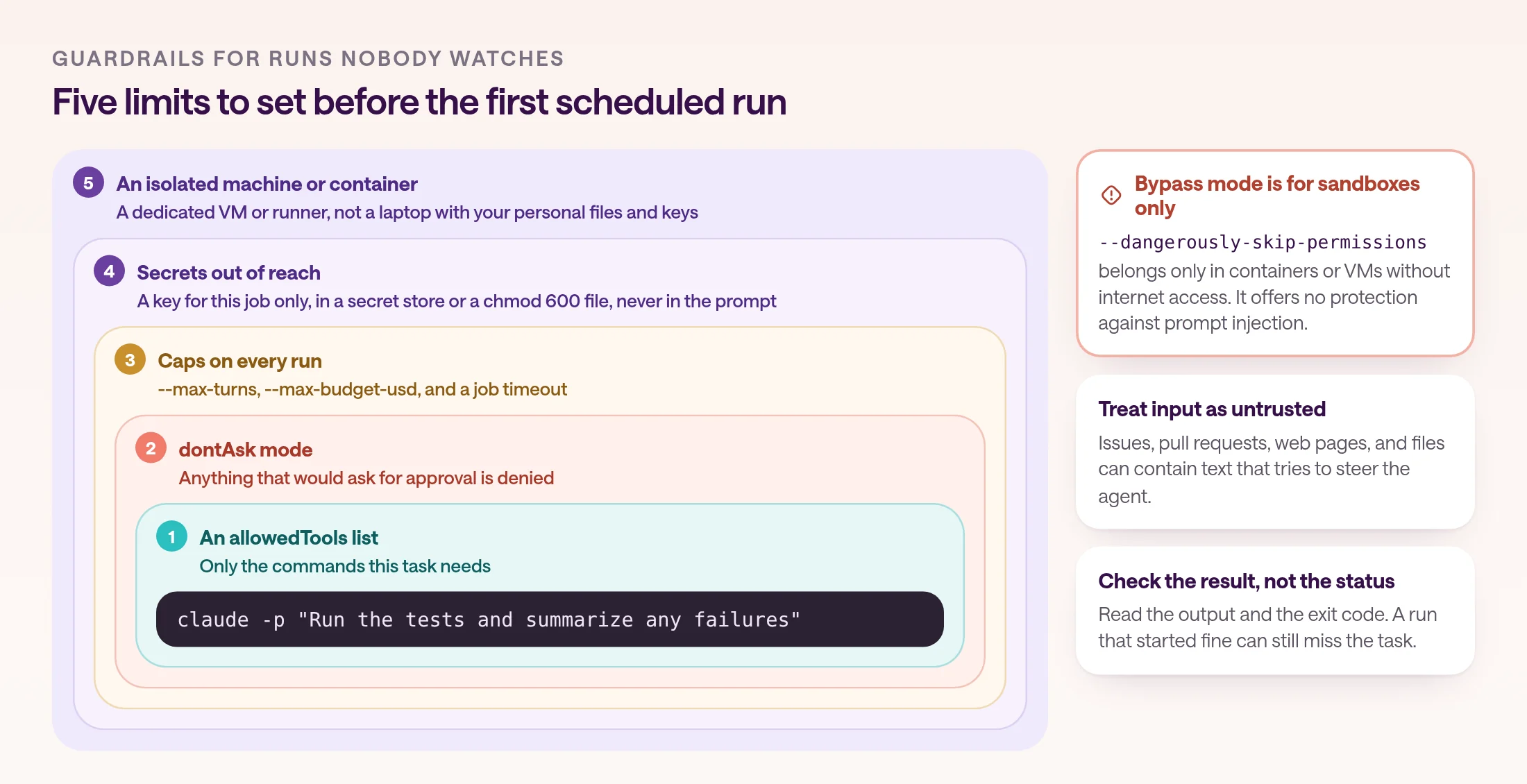
Limit what each run can do, keep secrets out of reach, treat everything the agent reads as untrusted, and cap how long it can run. Nobody is watching a scheduled run, so the limits have to be in place before it starts.
Start with permissions. Use dontAsk with a short --allowedTools list rather than bypassing permissions. Anthropic's permission modes guide says bypassPermissions belongs only in isolated environments such as containers or VMs without internet access, and that it offers no protection against prompt injection. Claude Code also refuses to start in that mode as root.
Treat what the agent reads as untrusted. Issues, pull requests, web pages, and files can contain text that tries to steer the agent, and Anthropic's security guidance says to avoid piping untrusted content straight to Claude. Before running claude -p in a repository you didn't write, remember that without --bare it runs that project's hooks and connects its MCP servers.
Cap the work. --max-turns ends a run after a set number of agent turns, --max-budget-usd stops at an estimated spend and can overshoot, and a GitHub Actions timeout-minutes ends a stuck job. Keep keys in a secret store or a file with tight permissions, never in the prompt or the repository, and prefer a key created only for this job.
What does it cost to run Claude Code on a schedule?
With an API key, you pay per token at API rates, plus GitHub Actions minutes if you use Actions. With a subscription, scheduled runs draw on the same usage limits as the rest of your Claude and Claude Code use.
Anthropic's cost guide says Claude Code charges by API token consumption. With a Console API key, usage is billed per token to your organization, and you can set workspace spend limits. On Team and Enterprise plans, usage draws from each member's seat allowance.
Subscriptions work differently. Routines, Desktop tasks, and runs that use a claude setup-token token draw down your plan, and Pro and Max limits are shared across Claude and Claude Code, with a five-hour session limit and a weekly limit. Anthropic says advertised Pro and Max limits assume ordinary, individual usage. A scheduled job that uses up your weekly limit can leave you without Claude when you need it, which is one more reason to give unattended jobs their own API key.
The biggest lever is the size of each run. A narrow prompt, a short tool list, and a turn cap cost less than an open-ended task, and the JSON output's total_cost_usd lets you see what each run cost before the bill arrives.
When should a scheduled job move to a managed agent platform?
Move a scheduled job to a managed agent platform when its results are for a team rather than one developer: when it needs company tools with shared access, a record anyone can check, and failure handling you don't have to build.
Claude Code schedules are built for a developer's own work. A routine belongs to one account, a cron job lives on one server, and a GitHub workflow lives in one repository. That is fine for test runs and repository chores. It gets awkward when a sales, support, or operations team needs the result, when the job needs tools like HubSpot or Slack under a team account, or when someone other than its author needs to fix it.
Managed agent platforms take over the scheduler, the runtime, and the history. Developers who are building an agent into a product can use Claude Managed Agents, whose scheduled deployments run sessions on a cron schedule with a time zone, in API beta, at $0.08 per session-hour plus tokens. You still build the app, the users, and the permissions around it.
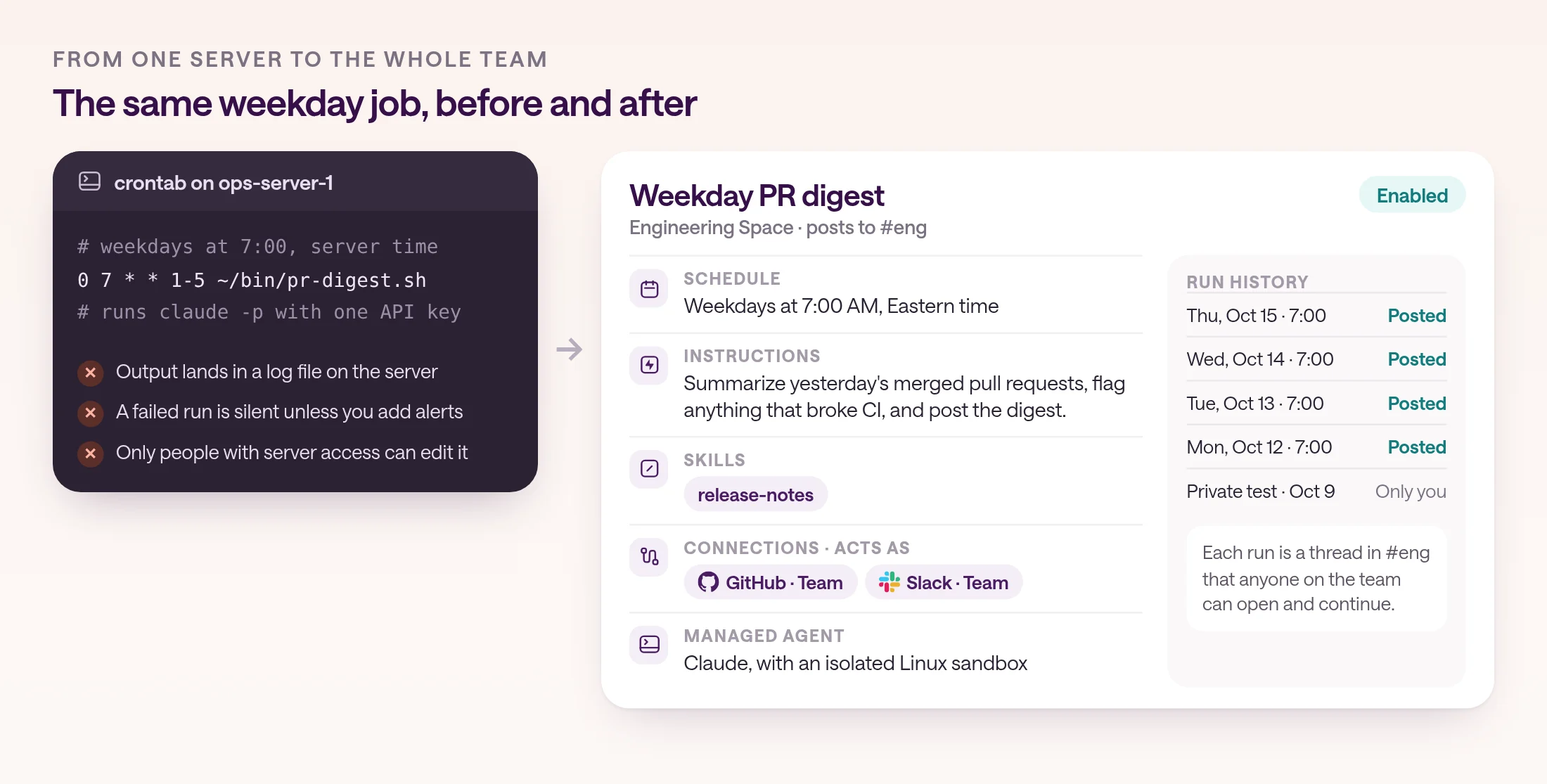
type.com is built for a team's own recurring work. A scheduled managed agent automation runs a managed Claude or Codex agent with the Space's connections, skills, and memory, on a schedule from every minute to monthly, or on a cron expression in code automations, which are in early access. Each run creates a thread the team can read and continue, a private test shows what a run will do before you enable it, and a schedule pauses after three failed runs in a row, so a broken job stops instead of repeating its mistake. Plans start at $50 a month for two members, including $100 of AI usage at provider rates.
- 1
Pick the job and the Space
Choose a scheduled job whose results the team needs, and the Space for the team that owns it.
- 2
Connect the tools once
Add GitHub, Slack, or the other tools the job uses as connections in that Space, so the automation can use a team connection instead of anyone's laptop.
- 3
Turn the prompt into instructions and a skill
Paste what your claude -p prompt asked for as the instructions. Move the reusable rules, such as report format and thresholds, into a skill the team can edit.
- 4
Set the schedule and destination
Pick the days, time, and time zone, and the channel where each run should post.
- 5
Test privately, then enable
Run a private test, check the output and tool calls, and enable the automation. Then retire the cron line.
Frequently asked questions
Can Claude Code run on a schedule?
Yes, in four ways: routines that run in Anthropic's cloud, Desktop scheduled tasks that run on your computer while the app is open, a GitHub Actions workflow with a cron trigger, or your own cron job that runs claude -p on a server. Routines and Desktop tasks need a Claude subscription login; GitHub Actions and cron can use an API key.
Does Claude Code have a built-in cron feature?
Yes. Routines run on a schedule in Anthropic's cloud, with a one-hour minimum, and are in research preview. Desktop scheduled tasks run as often as every minute, but only while the app is open and your computer is awake. Inside a session, /loop repeats a prompt until the session ends, and recurring loops expire after seven days.
Can I use my Claude Pro or Max plan for scheduled jobs?
Routines and Desktop tasks run on your subscription, and claude setup-token creates a one-year token for scripts and CI on Pro, Max, Team, and Enterprise plans. Anthropic says Pro and Max limits assume ordinary, individual usage and are shared with your use of Claude. For predictable unattended jobs, an API key bills per token instead.
How do I keep a scheduled Claude Code job from running up costs?
Cap each run with --max-turns, and with --max-budget-usd, which stops at an estimated spend and can pass the cap, so leave headroom. In GitHub Actions, add a job timeout. Read total_cost_usd from the JSON output to track spend per run, and set workspace spend limits in the Claude Console.
Is it safe to use --dangerously-skip-permissions in a cron job?
Not on a normal server. Anthropic says to bypass permissions only in isolated environments such as containers or VMs without internet access, and that bypass mode offers no protection against prompt injection. For scheduled jobs, use --permission-mode dontAsk with an --allowedTools list instead.
Can my team share a scheduled Claude Code job?
Not as a routine: routines belong to one claude.ai account, aren't shared with teammates, and act as that person. A GitHub Actions workflow is visible to people with access to the repository. For scheduled agent work that a whole team shares, with shared connections and a thread for every run, use a managed agent platform such as type.com.