Developer guide
How to trigger AI agents from webhooks, Slack, and cron
Verify each event, acknowledge fast, skip duplicates, and pick a scheduler, with the fine print from Slack, GitHub, and Stripe.
What can start an AI agent run?
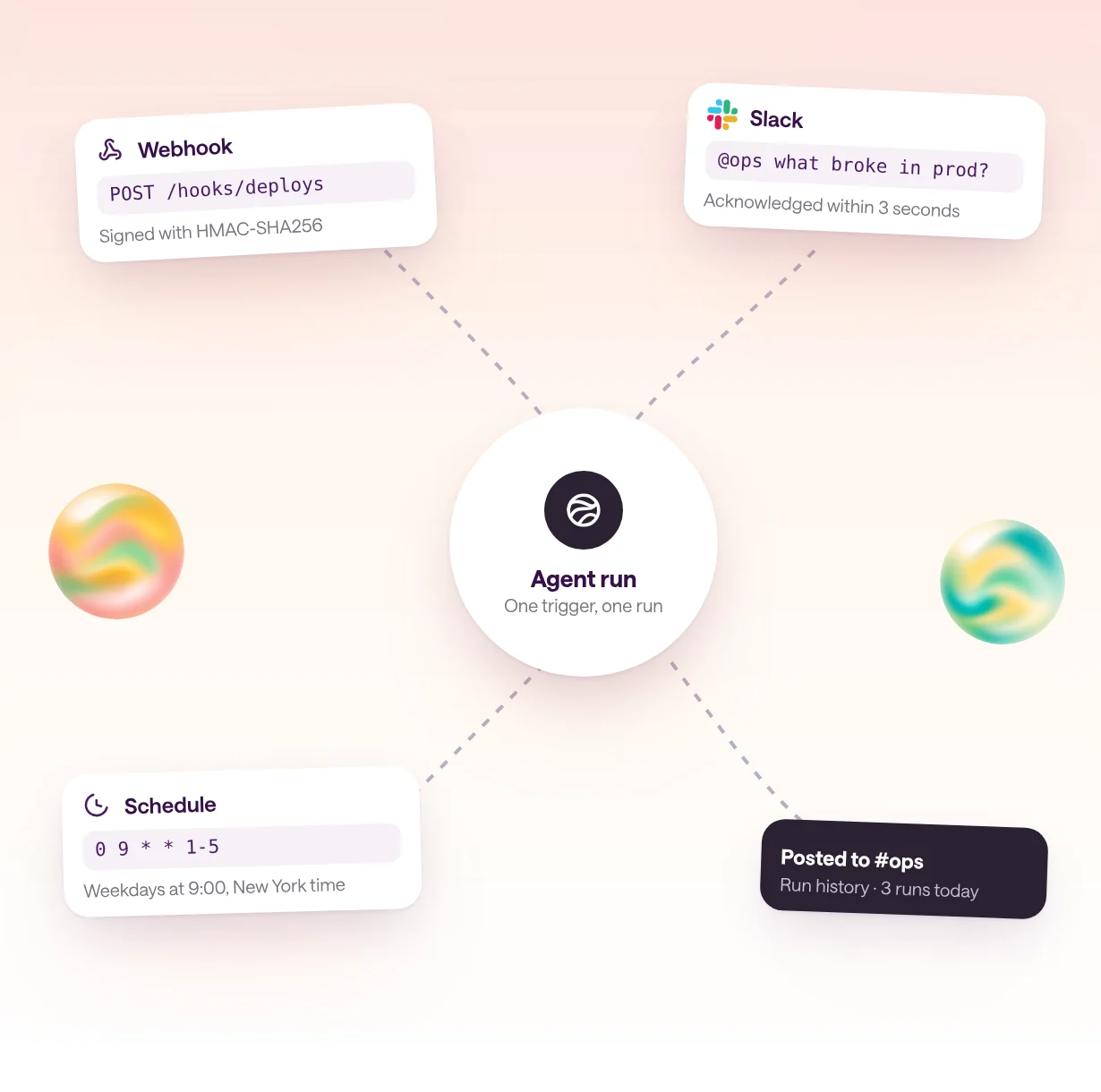
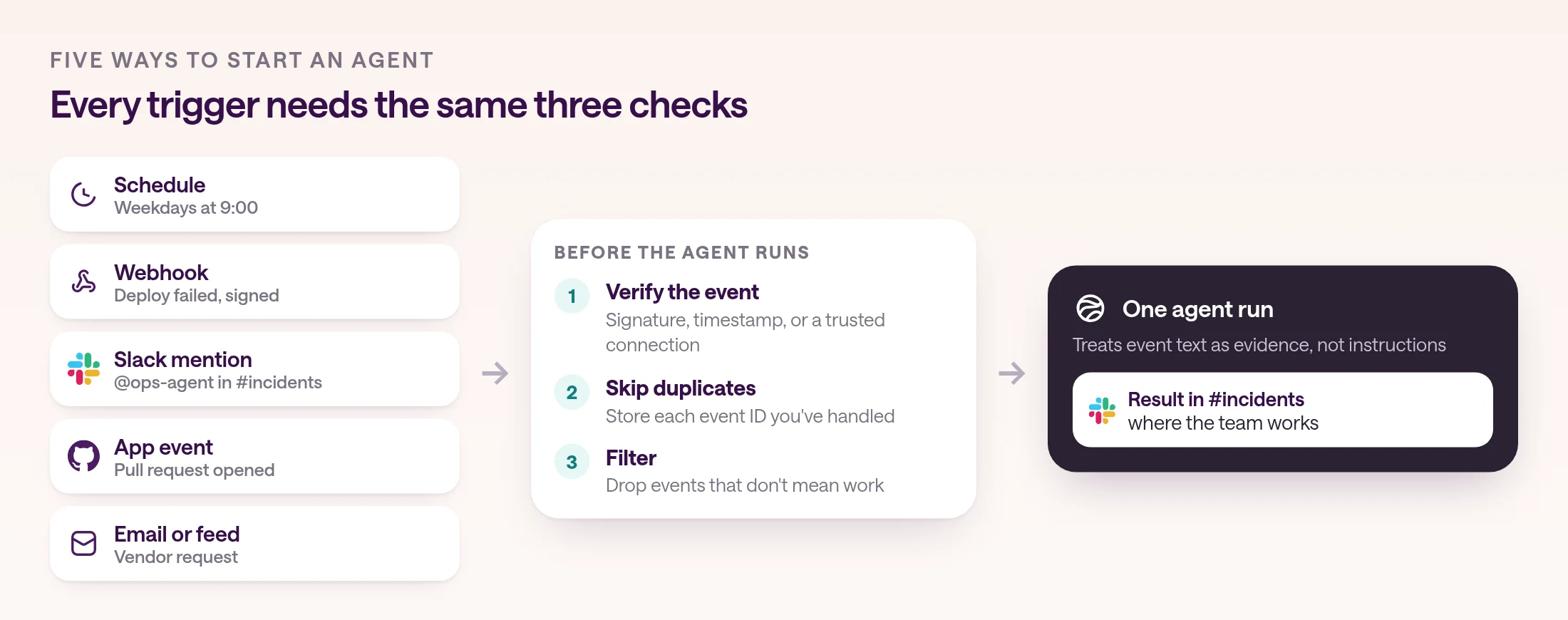
Five kinds of events can start an agent run: a schedule, a webhook from another system, a chat message such as a Slack mention, an app event such as a new pull request, and an inbound email or feed item. Each one needs the same three things: check that the event is real, start exactly one run for it, and send the result where people will see it.
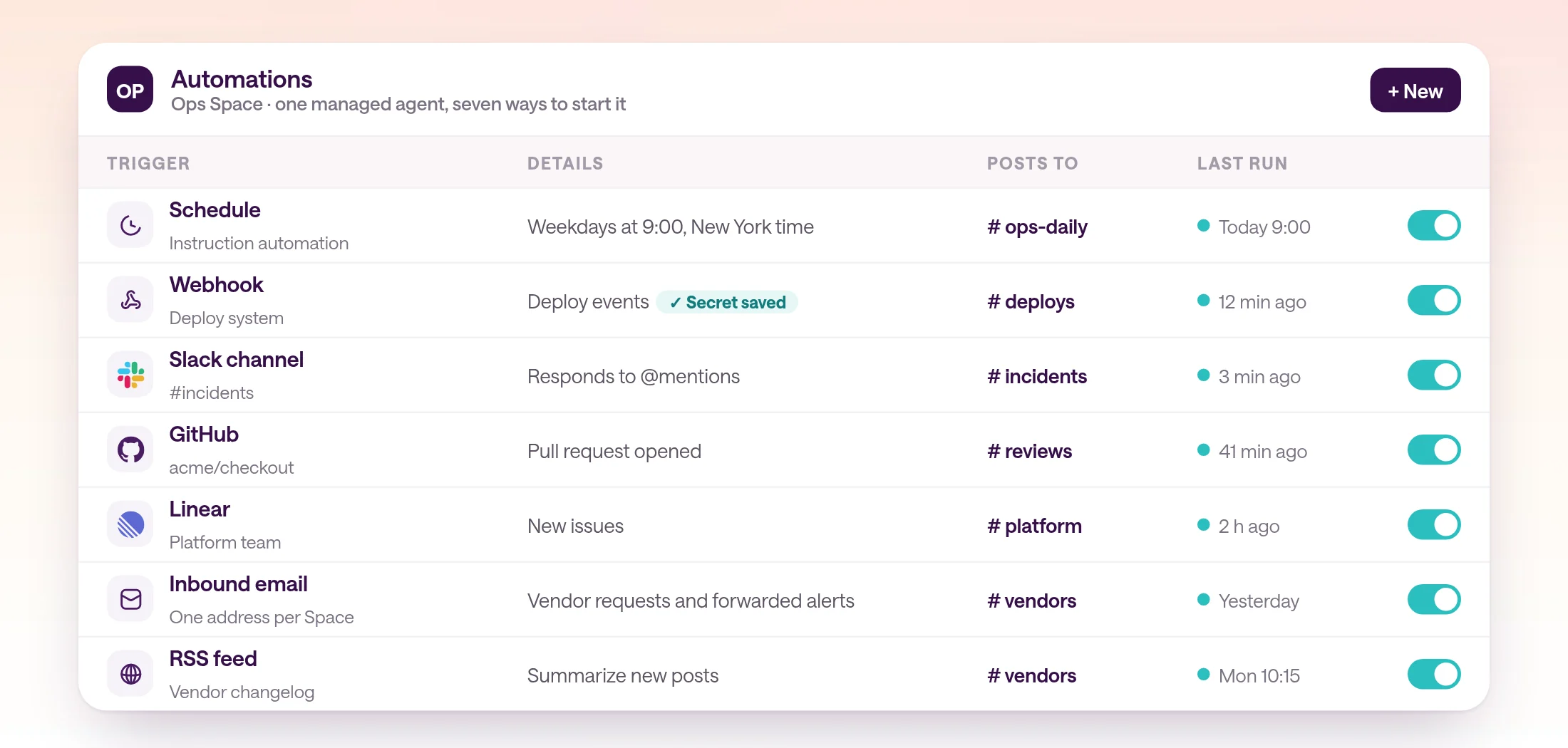
An agent that only answers when someone types into a chat box is a tool. An agent that starts on its own, when a deploy fails, a customer emails, or Monday morning arrives, is an automation. The trigger decides how quickly the agent responds, how much noise it creates, and what can go wrong.
The table compares the main trigger types. The sections below cover how to set up each one, using the senders' own documentation, and what type.com handles for you.
| Trigger | Good for | What to get right |
|---|---|---|
| Schedule | Reports, digests, and sweeps | Set a time zone, decide what happens to missed runs, and make reruns safe |
| Webhook | Alerts, payments, deploys, form submissions | Verify the signature, answer within the sender's timeout, and skip duplicates |
| Slack or chat | Questions and requests from the team | Acknowledge within three seconds and reply in the thread |
| App event | New pull requests, issues, and tickets | Subscribe to as few event types as possible |
| Email or feed | Vendor requests, forwarded alerts, changelogs | Treat the content as untrusted and filter before the agent runs |
How do you trigger an agent from a webhook?
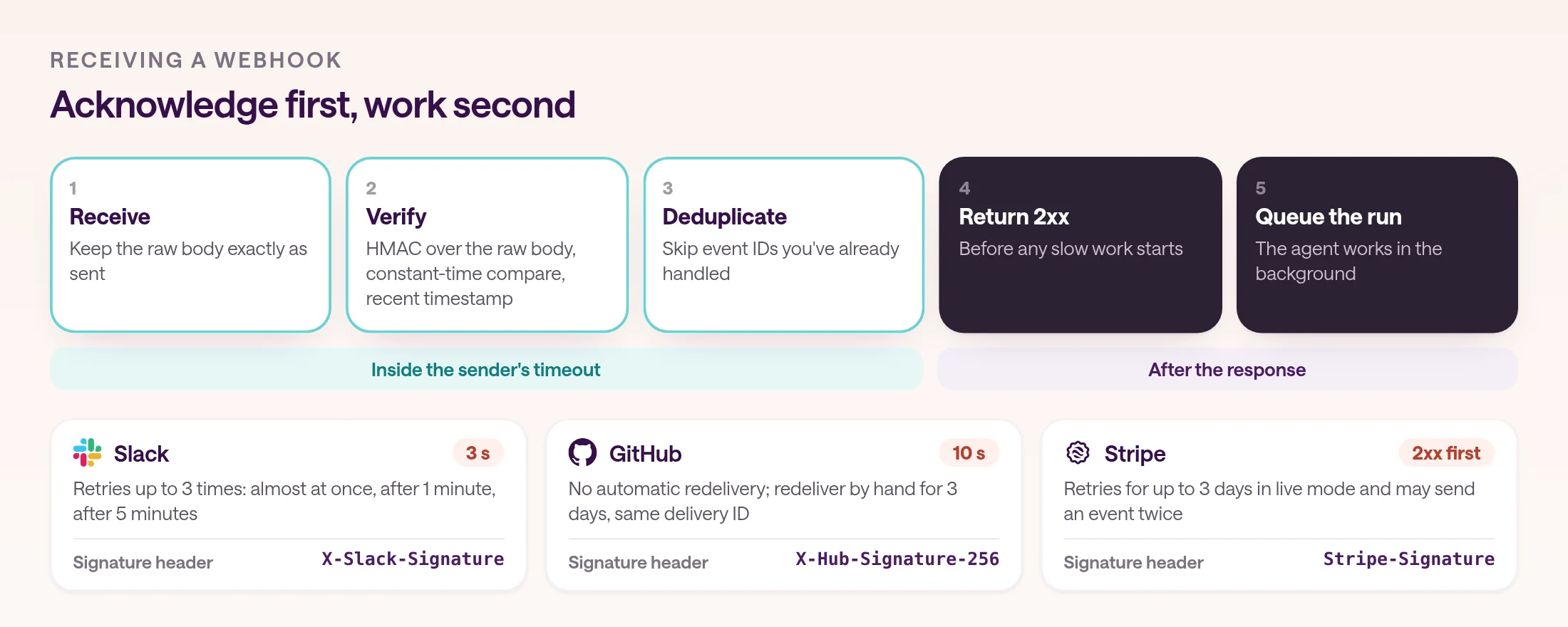
Give the sender an HTTPS endpoint, verify each request's signature against a shared secret, return a 2xx right away, and run the agent in the background. Use the event ID to skip duplicates, because senders retry.
Speed comes first, because senders don't wait for an agent. GitHub expects a 2xx within 10 seconds and treats a slower response as a failed delivery. Stripe says to return a 2xx before any complex logic. An agent run takes much longer than that, so accept the event, queue it, and let the agent run separately.
Then prove the event is real. Most senders sign the raw request body with HMAC-SHA256 and a secret you share: GitHub sends X-Hub-Signature-256, Slack sends X-Slack-Signature with a timestamp, and Stripe sends Stripe-Signature. Compute the signature over the raw bytes before parsing JSON, compare in constant time, and reject old timestamps to stop replays. Stripe's libraries allow five minutes by default.
Finally, expect duplicates. Stripe says endpoints might occasionally receive the same event more than once, GitHub keeps the same X-GitHub-Delivery ID when you redeliver, and the Standard Webhooks spec, which OpenAI and Anthropic follow, keeps the same webhook-id across retries and recommends it as an idempotency key. Store the IDs you've handled and skip repeats, so one alert never starts two agent runs.
On type.com, a webhook automation gives you the URL. Save the sender's shared secret and type.com verifies each request: it accepts HMAC-SHA256 or HMAC-SHA1 signatures of the body and detects the header from the first valid signed request. Senders that sign a timestamp along with the body, such as Stripe, may need a compatible custom sender. Without a secret, treat the URL itself as a credential. A 200 response means type.com accepted the event, not that the agent finished, so check the thread the event created. For engineers, code automations, in early access, can receive webhooks through an adapter that registers the webhook and verifies every request.
import { createHmac, timingSafeEqual } from "node:crypto";

// header looks like: X-Hub-Signature-256: sha256=<hex digest>
export function isValidSignature(
  rawBody: string,
  header: string,
  secret: string,
) {
  const digest = createHmac("sha256", secret).update(rawBody).digest("hex");
  const a = Buffer.from("sha256=" + digest);
  const b = Buffer.from(header);
  return a.length === b.length && timingSafeEqual(a, b);
}
How do you trigger an agent from Slack?
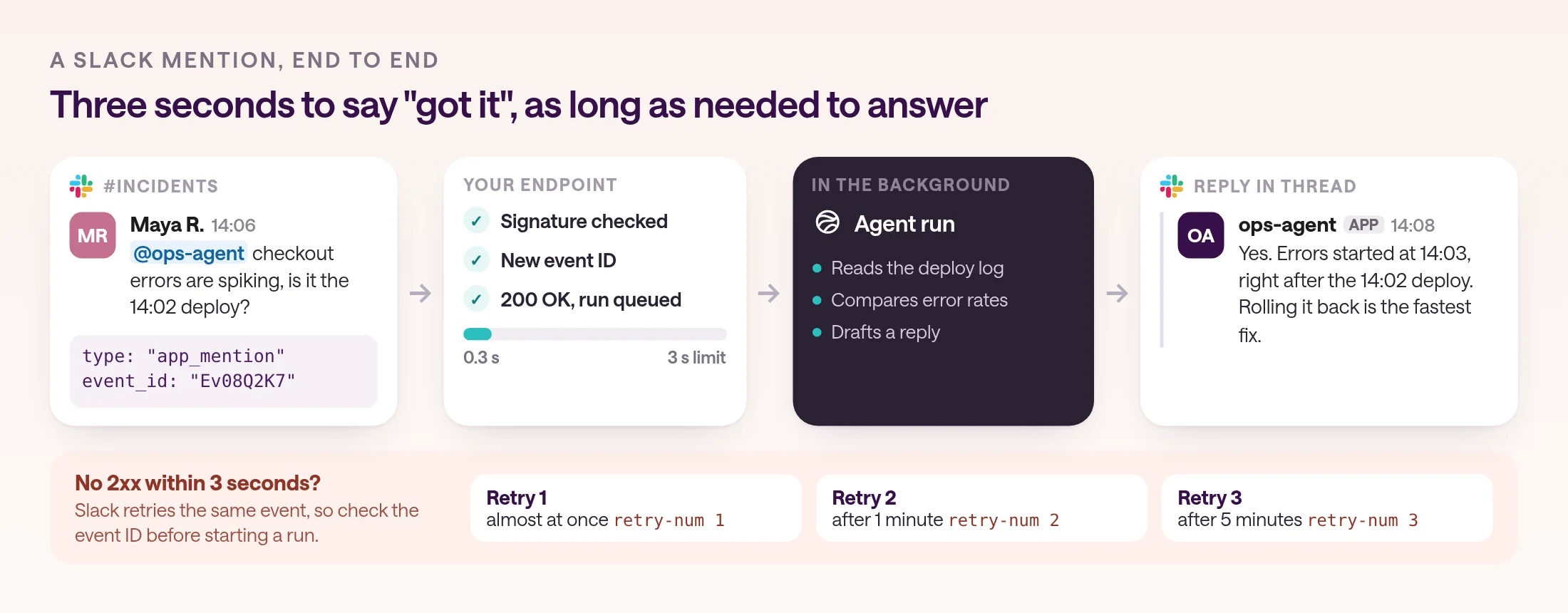
Subscribe to app_mention events so the agent runs only when someone asks for it, verify Slack's signature, acknowledge within three seconds, and post the answer in the thread when the agent finishes.
Slack's Events API expects an HTTP 2xx within three seconds. If it doesn't get one, it retries up to three times, nearly immediately, after a minute, and after five minutes, with x-slack-retry-num and x-slack-retry-reason headers, so a slow handler can start the same agent run three times. If more than 95% of deliveries fail within an hour, Slack temporarily disables your event subscriptions, unless your app receives fewer than 1,000 events an hour.
Choose the event carefully. app_mention fires only when someone mentions your app in a conversation it belongs to, and Slack itself recommends it if you only want messages sent to your app. The message events fire for every post in a channel, which is rarely what an agent should answer. Verify each request with your app's signing secret: the signature covers v0, the timestamp, and the raw body. If you can't expose a public URL, Socket Mode delivers Events API traffic without one, though Socket Mode apps aren't allowed in the public Slack Marketplace.
In type.com, you map a Slack channel to a Space and choose when the managed agent responds: on @mentions, on new channel messages, or on every message including thread replies. People can stop a response by adding a 🛑 reaction. Code automations can also run on Slack events such as a message containing a keyword or an added reaction, for example starting a job when someone reacts with a check mark.
How do you run an agent on a schedule?
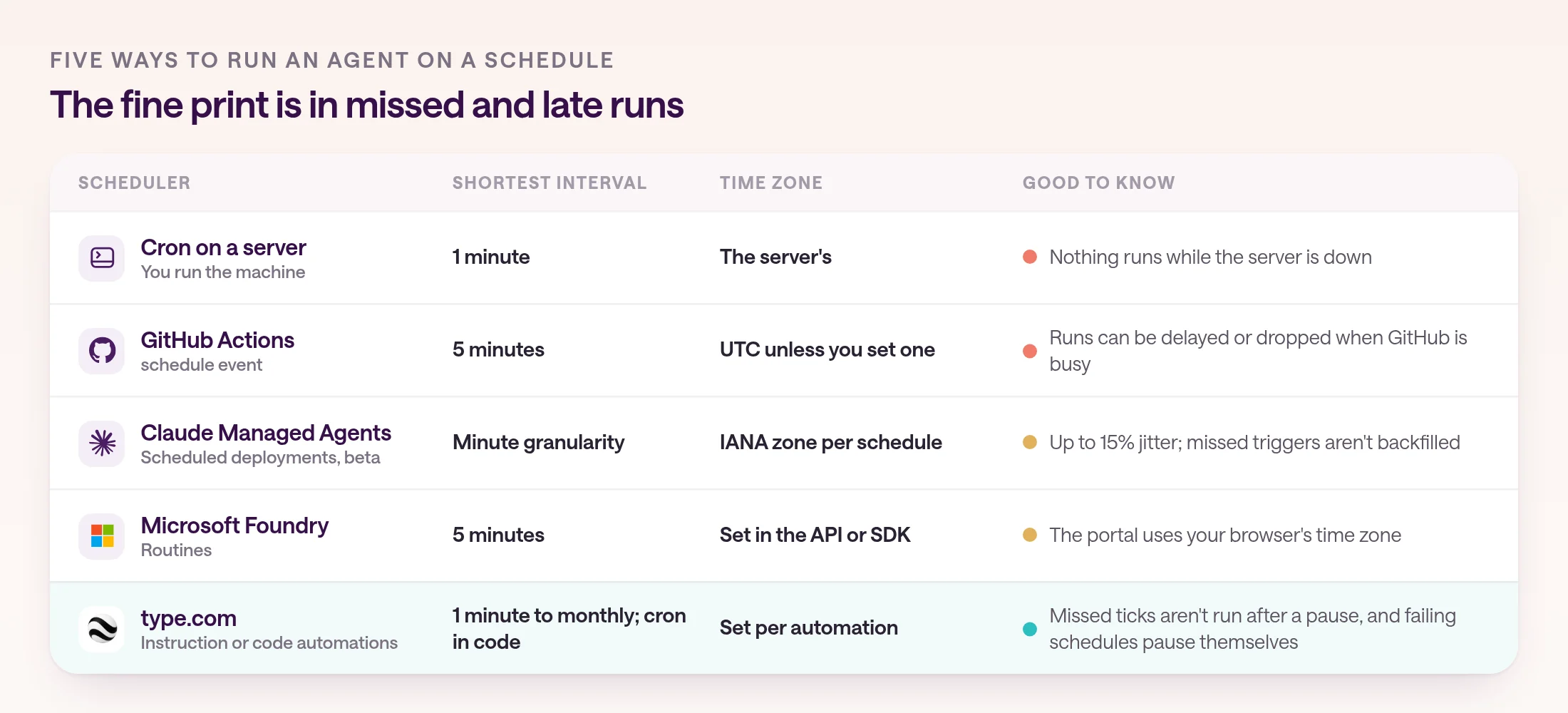
Use cron with an explicit time zone, decide what happens to runs missed while the schedule was paused, and make each run safe to repeat. Then pick a scheduler that matches how often you need to run and who has to keep it running.
Every scheduler has its own fine print. A GitHub Actions schedule runs at most every five minutes, in UTC unless you set an IANA time zone, only from the default branch, and it can be delayed or even dropped when GitHub is busy, especially at the top of the hour. Claude Managed Agents scheduled deployments, in beta, take a cron expression and a time zone at minute granularity, add jitter of up to 15% of the interval, and don't backfill triggers missed while paused. Microsoft Foundry routines accept cron with a five-minute minimum and a time zone.
Two rules apply everywhere. Write the time zone down, because 9:00 means different things to a server in UTC and a team in New York. And make each run idempotent: if a run is retried or fires twice, it should update the same report or skip work it already did, rather than post twice.
type.com schedules run instruction automations from every minute to once a month, including the first or last weekday of the month, and code automations, in early access, accept a cron expression with a required IANA time zone. Neither kind runs the ticks it missed while paused, and a scheduled instruction automation pauses after three failed runs in a row. If you're scheduling Claude Code itself, see how to run Claude Code on a schedule.
# minute hour day-of-month month day-of-week
0 9 * * 1-5      weekdays at 9:00
0 8 * * 1        Mondays at 8:00
*/30 * * * *     every 30 minutes
0 7 1 * *        the 1st of every month at 7:00
How do you trigger an agent from GitHub, Linear, or email?
Subscribe to the narrowest event that signals real work, such as a merged pull request rather than every push, and let the platform deliver and filter the events. Use email and RSS for systems that can't send webhooks.
GitHub sends webhooks for pull requests, issues, pushes, reviews, releases, and CI runs. It doesn't redeliver failed deliveries automatically, though you can redeliver them by hand for three days, so an endpoint that's down during a burst of pull requests can quietly miss work. Platforms that receive the events for you take that job off your plate.
In type.com, GitHub events can start an instruction automation, where the managed agent follows your instructions with the Space's skills, or a code automation that filters the event and hands only the judgment step to the agent. Linear changes to issues, comments, projects, cycles, labels, and reactions can start instruction automations. Each Space can have one inbound email address for vendor requests and forwarded alerts, and an RSS trigger can watch a public changelog or competitor blog. type.com disables a feed after five consecutive fetch errors, or immediately on HTTP 410.
Keep app triggers narrow. Start with one event that reliably means work, such as a pull request opened against main, and add more only when the agent's output is useful every time.
How do you keep triggered agent runs from misfiring?
Filter events before the agent runs, deduplicate them, treat event text as evidence rather than instructions, and decide in advance what a failed run does. Triggers multiply both the value and the mistakes of an agent.
Filter early and cheaply. A keyword or field filter should drop most events before any model runs. When the decision needs judgment, such as whether a Slack message reports a current outage or an old one, a small yes-or-no question to a model can decide whether the event goes through. type.com supports both in code automations, with text and field matchers plus AI questions that return typed answers.
Assume event content is hostile. Webhook payloads, Slack messages, emails, and feed items are written by people outside your control, and any of them can contain text that looks like an instruction. type.com's docs say to tell the managed agent to treat event text as evidence, not as instructions. Pair that with narrow write access and an approval step for anything consequential.
Plan for failure. Decide whether a failed run should retry, alert someone, or pause the automation, and test that path before you rely on it. type.com doesn't retry failed runs automatically: a scheduled instruction automation pauses after three failures in a row, and a code automation pauses after its first failure and starts a repair. For actions that need a person's sign-off, see human-in-the-loop approval workflows.
- Verify every webhook and Slack request against its signature.
- Return a 2xx before the agent starts working.
- Store event IDs and skip duplicates.
- Filter before the model runs, not after.
- Treat event text as evidence, never as instructions.
Which platforms handle agent triggers for you?
Developer runtimes give you a scheduler at most, and leave webhooks and chat triggers to your application. Workflow tools and team platforms receive the events for you.
Claude Managed Agents runs sessions on a cron schedule or when your application calls its API, and its webhooks report state changes rather than starting work. The OpenAI Agents API starts sessions from your application and uses webhooks to report session state; no built-in scheduler is documented. Microsoft Foundry routines add schedules, timers, GitHub issues, and Teams messages.
Workflow tools cover more sources but differ on speed. Zapier triggers either poll, every 15 minutes on Free, 2 on Professional, and 1 on Team and Enterprise, or arrive instantly by webhook. n8n gives each Webhook node a test URL and a production URL, plus a Schedule Trigger that works like cron.
| Platform | Schedules | Webhooks in | Chat and app events |
|---|---|---|---|
| Claude Managed Agents | Cron with a time zone, in beta | No; webhooks report state changes | Your app calls the API |
| OpenAI Agents API | None documented | No; webhooks report session state | Your app starts sessions |
| Microsoft Foundry routines | Cron, five-minute minimum | No generic webhook | GitHub issues and Teams messages |
| Zapier | Polling every 1 to 15 minutes by plan | Instant triggers by webhook | Triggers from connected apps |
| n8n | Schedule Trigger | Webhook node with test and production URLs | Trigger nodes in workflows |
| type.com | Every minute to monthly, or cron in code | Webhook URL with signature checks, or code adapters | Slack, GitHub, Linear, email, and RSS |
How do you set up your first triggered agent?
Start with one trigger that reliably means work, prove it with a test event, and add filters and approvals before you add more triggers.
The fastest way to get value is one event, one agent, one destination. Once that run is useful every time, adding a second trigger is easy. Adding a noisy one first is how teams end up muting their agent.
- 1
Pick one event that means work
A failed deploy, a new support email, or Monday at 8:00. Write down who should see the result and where.
- 2
Connect the source and verify it
Save the sender's signing secret, or connect the app so its events arrive already authenticated.
- 3
Write instructions that treat the event as data
Say which fields matter, when to act, when to ask, and when to only notify.
- 4
Send a test event
Check the run it starts, the tools it calls, and where the result lands. Then try a duplicate and a malformed event.
- 5
Turn it on and watch the first week
Review the runs, tighten the filters, and only then add the next trigger.
Frequently asked questions
How do I trigger an AI agent from a webhook?
Give the sending service an HTTPS endpoint, verify each request's signature with a shared secret, return a 2xx quickly, and start the agent run in the background. Use the event's ID to skip duplicates, because senders retry. On type.com, a webhook automation gives you the URL and verifies signatures when you save the sender's secret.
How fast does a Slack bot have to respond?
Slack expects an HTTP 2xx within three seconds, or it counts the delivery as failed and retries up to three times. Acknowledge the event first, then let the agent work and post its answer in the thread when it's done.
How do I run an AI agent on a schedule?
Use a scheduler with an explicit time zone, such as cron on a server, a GitHub Actions schedule, Claude Managed Agents scheduled deployments, Microsoft Foundry routines, or type.com schedules. Decide what should happen to runs missed while the schedule was paused, and make each run safe to repeat.
What's the difference between polling and webhook triggers?
A webhook trigger runs when the other service sends an event, usually within seconds. A polling trigger checks for new data on an interval. Zapier, for example, polls every 15 minutes on its Free plan and every minute on Team and Enterprise.
How do I stop duplicate agent runs?
Store each event's ID and skip any you've already processed. GitHub keeps the same X-GitHub-Delivery ID when you redeliver, Standard Webhooks senders keep the same webhook-id across retries, and Stripe recommends logging processed event IDs. Write actions should also be safe to repeat.
Can event text make an agent do something it shouldn't?
Yes. A webhook payload, Slack message, or email is written by someone outside your control, so tell the agent to treat it as evidence, not instructions, filter events before the agent runs, and keep write access and approvals tight.