
Security guide
How to give AI agents access without exposing credentials
Credential brokers, short-lived tokens, least privilege, and which account the agent uses.
Why shouldn't an AI agent hold your API keys?
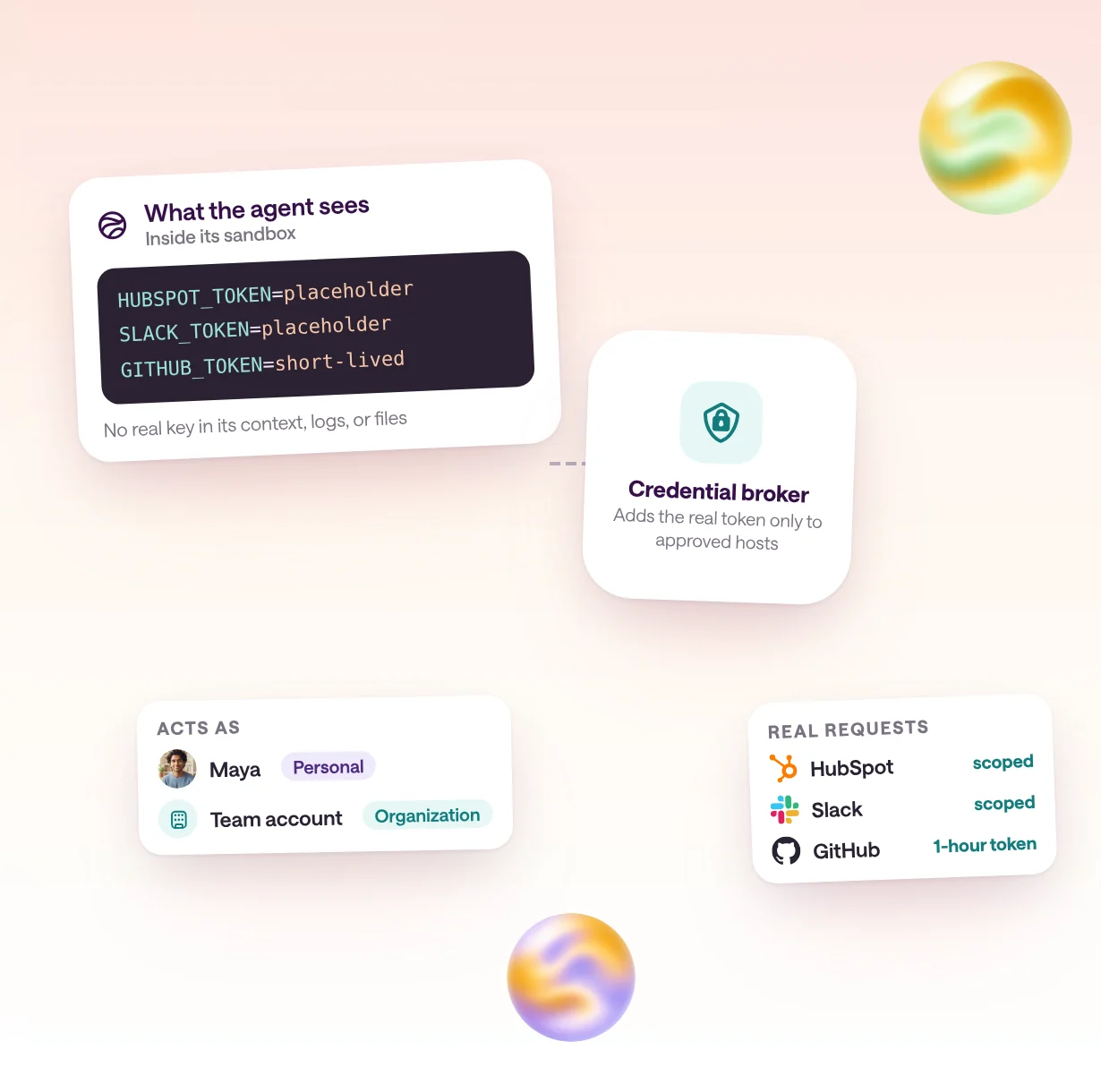
Anything an agent can read, a prompt injection can try to send somewhere else. Keys in prompts, environment variables, or files end up in the model's context, in logs, and in code the agent writes, so keep real credentials outside the agent and give it only the access each task needs.
Agents read untrusted content all day: web pages, emails, tickets, and files. Anthropic's secure deployment guide warns that agents can take unintended actions because of prompt injection or plain model error, and that even read-only access to a code directory can expose credentials. OpenAI's Agents API docs make the same point from the other side: injecting a stored secret into the environment still exposes it to agent-generated code.
The risk isn't only theft. An agent holding a broad key can do broad damage by mistake. OWASP calls this excessive agency, listed as LLM06 in its 2025 Top 10 for LLM applications and LLM03 in the 2026 edition, and traces it to three causes: too much functionality, too many permissions, and too much autonomy.
So the goal has two halves. Keep the secret out of the agent's reach, and shrink what the access can do even if the agent misbehaves.
What are the safe ways to give an agent access?
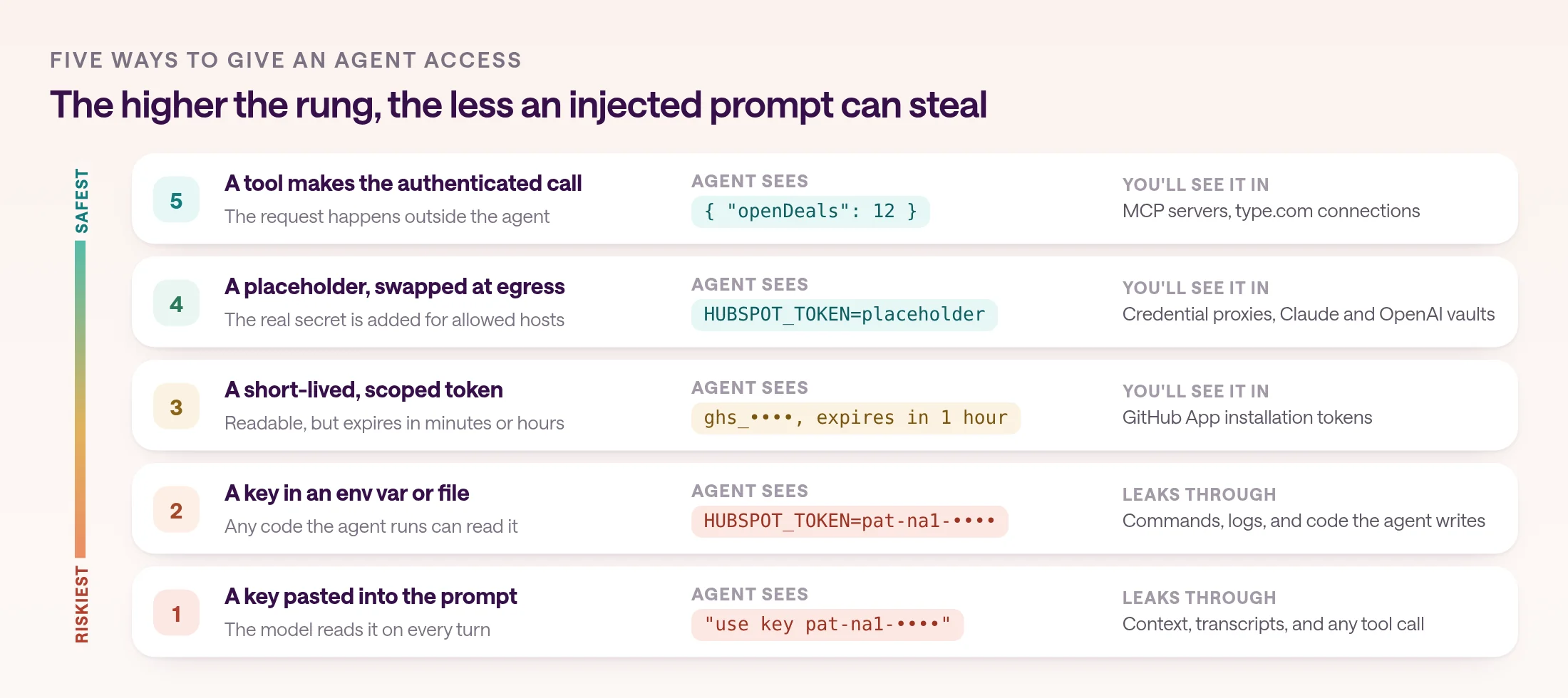
Four patterns keep real secrets away from the agent: a credential broker that adds them to outgoing requests, tools that make the authenticated call outside the agent, short-lived scoped tokens, and delegated OAuth with tokens bound to the right service.
A credential broker, or proxy, sits outside the agent's security boundary. Anthropic calls it the recommended approach for the Claude Agent SDK: the agent sends requests without credentials, the proxy adds them, and the agent never sees the real secret. The closely related tool pattern goes further. The agent calls a tool, the authenticated request happens outside the agent, and only the result comes back.
Short-lived tokens limit the damage when a token does reach the agent. A GitHub App installation token expires after an hour, and OWASP's agentic Top 10 recommends short-lived, narrowly scoped tokens per task. Delegated OAuth lets an agent act with a user's consent instead of a shared key. The Model Context Protocol's authorization spec requires OAuth 2.1, tokens issued for the specific server that receives them, and no passing a client's token through to another service.
| Pattern | How it works | Where you'll see it |
|---|---|---|
| Credential broker or proxy | Adds the secret to outgoing requests outside the agent | Claude Agent SDK guidance; Claude Managed Agents and OpenAI vaults |
| Tool runs the call | The agent asks for an action; the authenticated request happens elsewhere | MCP servers; type.com connections |
| Short-lived, scoped tokens | Credentials that expire in minutes or hours and cover one task | GitHub App installation tokens; type.com code automation runs |
| Delegated OAuth | The user grants access; tokens are bound to one service | MCP authorization; AgentCore Identity; Microsoft Entra Agent ID |
How do agent platforms keep credentials out of the agent?
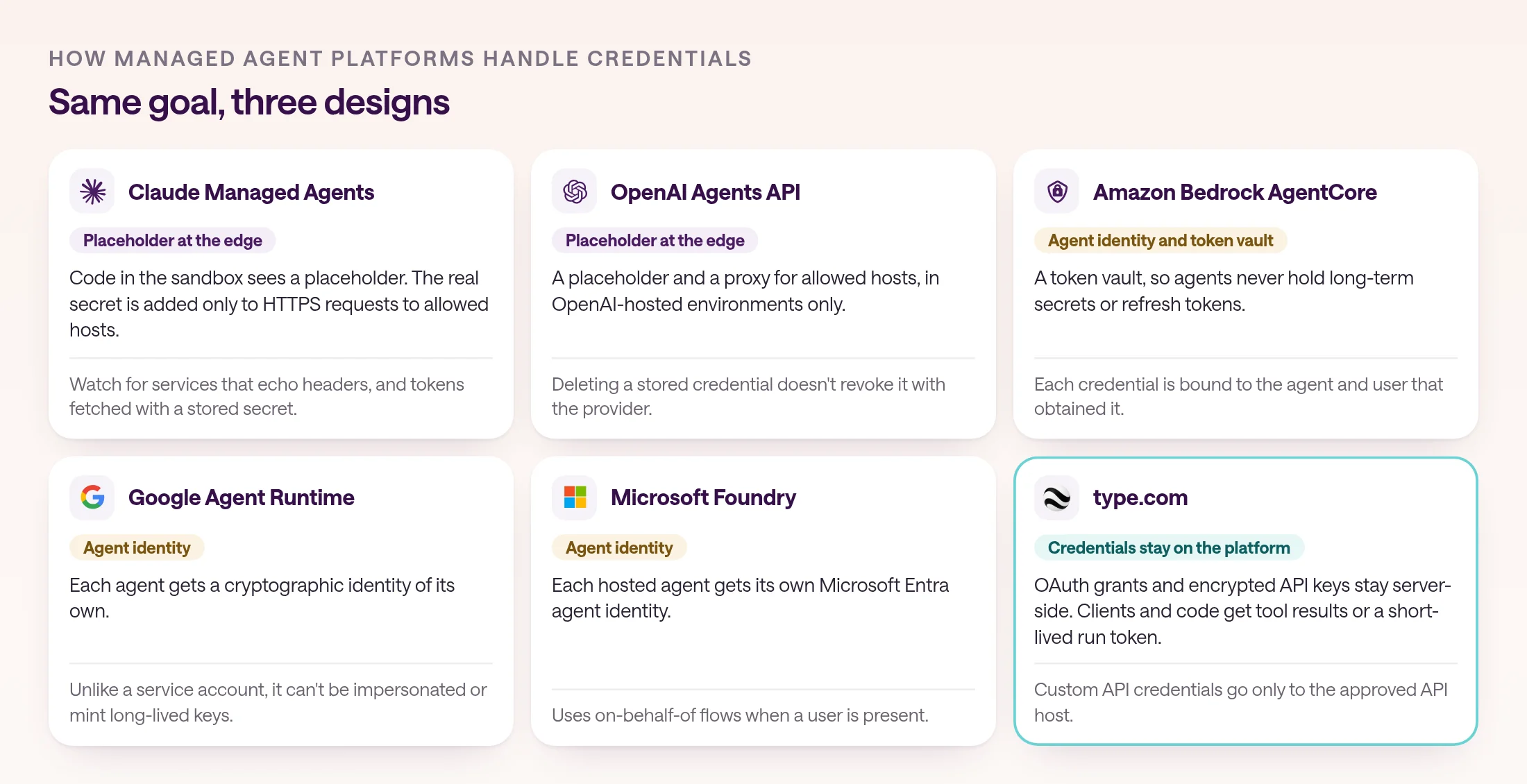
Managed agent platforms either swap a placeholder for the real secret on the way out of the sandbox, give the agent its own identity with a token vault, or keep credentials on their own servers and return only results.
Claude Managed Agents and the OpenAI Agents API both use vaults. Code in the sandbox sees a placeholder, and the platform swaps in the real secret only on outgoing HTTPS requests to the hosts the credential allows. Read the caveats, too. A service that echoes request headers can hand the secret back, a token fetched with a stored secret, such as an OAuth client-credentials grant, arrives in the sandbox unredacted, and neither vault can supply a secret for local signing. OpenAI's vaults work only in OpenAI-hosted environments, and deleting a stored credential doesn't revoke it with the provider.
The cloud platforms lean on identity. Amazon Bedrock AgentCore Identity separates storing credentials from using them, so agents never have direct access to long-term secrets or refresh tokens, and its token vault binds each credential to the agent and user that obtained it. Google gives each agent a cryptographic identity that, unlike a service account, can't be impersonated or used to mint long-lived keys. Microsoft Foundry gives every hosted agent its own Microsoft Entra agent identity, using on-behalf-of flows when a user is present.
type.com keeps connections on its own servers. It stores OAuth grants and encrypted API keys server-side, the type.com CLI and MCP clients receive only tool metadata and results, and a code automation run gets a short-lived token rather than a provider credential. For a custom API, type.com delivers the credential only to the approved API host. Whichever platform you use, Anthropic's advice holds: limit a key's permissions at the service that issued it, because the platform's settings don't.
Which account should an AI agent act as?
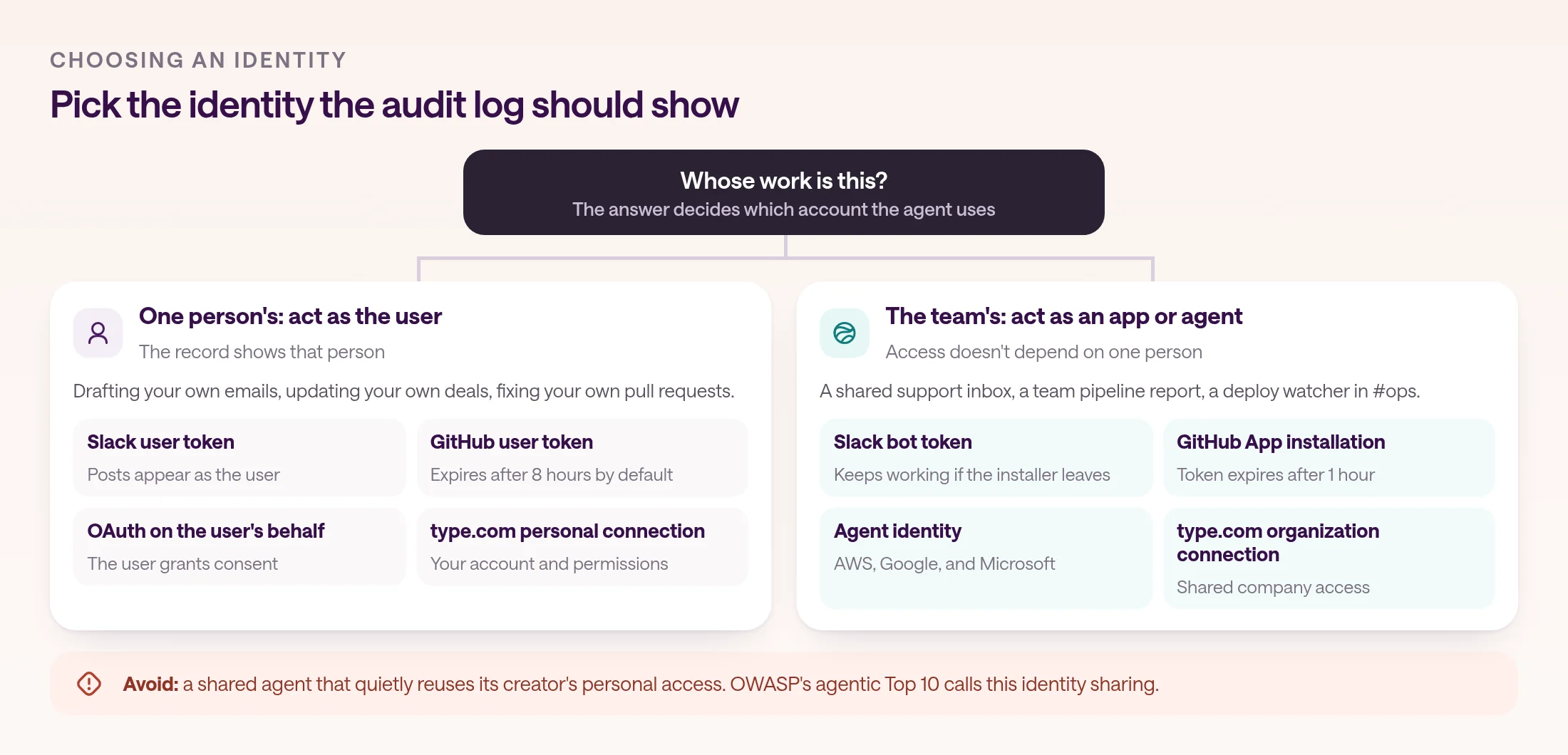
Act as the user when the agent does one person's work and the record should show that person. Act as an app or agent identity for shared team work. Don't let a shared agent quietly reuse one person's access.
Most platforms already make this choice explicit. In Slack, bot tokens belong to the app and keep working when the installing user leaves, while writes with a user token appear as that person. A GitHub App can act as an installation, attributed to the app with a token that lasts an hour, or on behalf of a user, attributed to the user and limited to what both the user and the app can reach. Agent identities from AWS, Google, and Microsoft add the same choice for agents: act as themselves, or on a user's behalf, and AWS and Google record both identities when they do.
OWASP's guidance points the same way. Actions on behalf of a user should run in that user's context with the minimum privileges needed, and its agentic Top 10 names identity sharing, an agent letting other people use its maker's access, as a core risk.
In type.com, connections are personal or organization-level. A personal connection uses one person's account and permissions, and an organization connection uses shared company access, such as a CRM account the whole sales team relies on. Each connection is assigned only to the Spaces that need it, AI works with the access of the person who started the work, and a scheduled automation acts as the person who created it. Where account selection is turned on, you can pin an automation to the team connection or to your own.
How do you limit what an agent can do with its access?
Limit access at three layers: the account in the provider, the connection in your agent platform, and the actions the agent may take without a person. Any one layer can fail, so don't rely on only one.
Start at the provider. Give the account or key the narrowest scopes the job needs, because platform settings can't shrink a credential's own permissions. The MCP security guidance recommends a progressive, least-privilege scope model, asking for more only when a task needs it.
Then narrow the connection. In type.com, admins can set a connection to read-only or full access for a workspace, a Space, or one user, and read-only access is checked when tools are listed and when they're called. The provider credential itself isn't re-scoped, though, so for data that must never change, connect an account whose permissions in that app prevent writes. Assign each connection only to the Spaces that need it, because adding a connection to the workspace doesn't give every Space access.
Finally, put a person in front of consequential writes. OWASP recommends human approval for high-impact actions and authorization enforced in downstream systems rather than left to the model. type.com apps ask for confirmation before any action that can delete data or change data through a person's connected account. For designing that step, see human-in-the-loop approval workflows.
- Provider: the narrowest scopes and the shortest-lived tokens available.
- Platform: read-only by default, full access only where needed, and Space-by-Space assignment.
- Agent: approvals for writes that are hard to undo.
How do you connect HubSpot to Claude without sharing a key?
Connect HubSpot once in a broker that keeps the token, then give Claude access to the broker over MCP with OAuth, so the token never sits in your terminal, prompt, or repository.
Local MCP servers usually take an API key as an environment variable, which leaves the key in configuration on your machine. Remote servers can use OAuth instead: Claude Code adds them with claude mcp add --transport http, and you sign in from the /mcp menu. Claude Code keeps only its sign-in to that server; the tokens for the tools behind it stay with the server.
type.com's hosted MCP server works this way. It needs no API key, every request runs as the signed-in type.com user with the same permissions as the web app, and it can call your connected integrations, including HubSpot. type.com keeps the OAuth tokens on its servers, read-only connections leave out write tools, and calls that send, post, edit, or delete data count as consequential, so your client should ask you before running them.
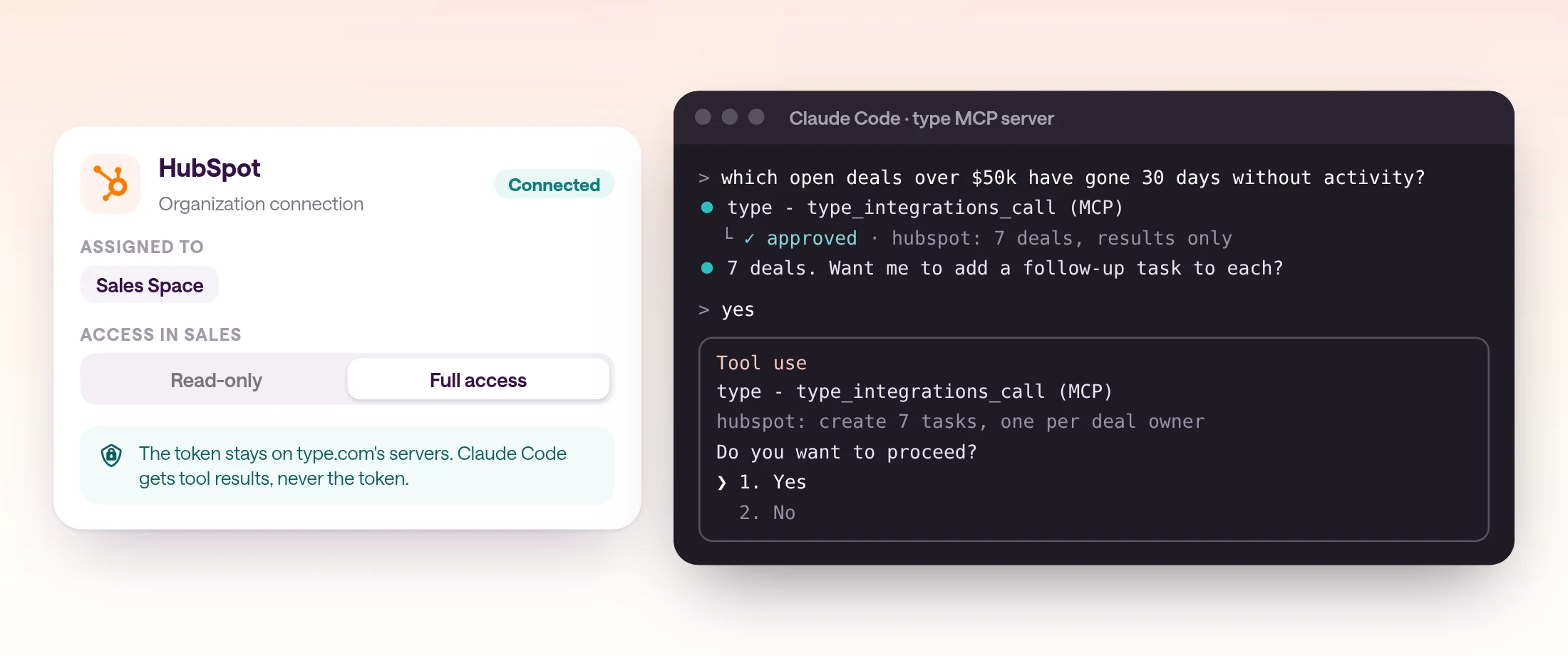
- 1
Connect HubSpot once
In type.com, connect HubSpot as an organization connection for shared CRM data, or as your personal connection for your own access.
- 2
Assign it and set the access
Add the connection to the Space that needs it, such as Sales, and keep it read-only until a workflow needs to write.
- 3
Add type.com to Claude Code
Run claude mcp add --transport http type https://api.type.com/mcp, then sign in from /mcp.
- 4
Ask, then approve writes
Ask Claude to read deals or contacts. When a task needs to change a record, review the request before you approve it.
claude mcp add --transport http type https://api.type.com/mcp
# then run /mcp inside Claude Code and sign in to type.com
What belongs on an AI agent credential checklist?
No secrets in prompts or instructions, a broker or tool between the agent and every credential, the narrowest scopes and shortest lifetimes available, an identity chosen on purpose, and approvals for writes that are hard to undo.
Revisit the list whenever you add a connection or a new kind of automation. Most credential incidents start with a shortcut taken during setup, like a token pasted into a prompt to get a demo working.
- No keys in prompts, instructions, skills, documents, or chat messages.
- A credential broker, vault, or tool between the agent and every secret.
- Scopes as narrow as the job, set at the provider, not only in the platform.
- Short-lived tokens wherever the provider offers them.
- A deliberate choice of identity: the user's for personal work, an app's for team work.
- Read-only by default, and approval before consequential writes.
- Rotate and revoke at the provider; deleting a stored copy isn't revoking it.
Frequently asked questions
Should I put an API key in an AI agent's prompt or environment?
No. Anything an agent can read, a prompt injection can try to send somewhere else. Keep the real credential outside the agent: a proxy or vault that adds it to outgoing requests, or a tool that makes the authenticated call and returns only the result.
What is a credential proxy for AI agents?
A service outside the agent's sandbox that adds credentials to the agent's outgoing requests. Anthropic recommends this pattern for the Claude Agent SDK, and Claude Managed Agents and the OpenAI Agents API build it in with vaults: code in the sandbox sees a placeholder, and the real secret is added only for approved hosts.
Should an AI agent act as a user or as a bot?
Act as the user when the agent works for one person and the record should show that person. Act as an app or service identity for shared team work, so access doesn't depend on one person and logs show the agent. Avoid letting a shared agent quietly reuse its creator's personal access.
How do I give Claude access to HubSpot without sharing a key?
Connect HubSpot once in a broker that keeps the token, then give Claude access to the broker over MCP with OAuth. With type.com, you connect HubSpot in a Space and add type.com's hosted MCP server to Claude or Claude Code; type.com keeps the token on its servers and the client receives only tool results.
Does read-only mode stop an agent from changing data?
Only as far as the platform enforces it. type.com checks read-only access when listing and calling tools, but the provider credential itself isn't re-scoped. For data that must never change, also connect an account whose permissions in that app prevent writes.
What is excessive agency in AI agents?
OWASP's name for an agent that can take damaging actions because it has too much functionality, too many permissions, or too much autonomy. It was LLM06 in OWASP's 2025 Top 10 for LLM applications and is LLM03 in the 2026 edition. The fixes are minimum permissions, acting in the user's context, and human approval for high-impact actions.